- Create schools and classes
- Invite students to join your classes from inside the Vocab Victor app!
- Create word lists based on what you think your students most need to learn!
- Assign the lists to your students!
- Word list words will appear in Vocab Victor's word learning games automatically! Students will learn words from a combination of matching games, associations, word puzzles, and definition review!
- Monitor your students' progress so you know which words they've mastered!
- Encourage friendly competition with our new class leaderboard!
"We may not have ended up where we intended to go, but we ended up where we needed to be." Douglas Adams
Thursday, March 25, 2021
Vocab Victor Classroom
TypeTastic
*A great way for students to practice their keyboarding/typing skills while school is doing Remote Learning.
TypeTastic is an excellent K-12 site for students learning how to Type/Keyboard. TypeTastic's School Edition has an educational portal that allows educators to track, monitor, and assess student progress. This is a fun and great way to integrate technology into a classroom's curriculum. TypeTastic uses over 400 innovative games, activities and drills to help teach and reinforce keyboarding/typing skills.
- Explore the Keyboard: Unique keyboard visualization splits the letters into nine color-coded groups so students see the keyboard like a map and can quickly find the correct letters.
- All Fingers Aboard: These games are designed to challenge kids to learn the fundamentals of typing. All sections are centered on finger movement, often first separated into either right- or left-hand activities, followed by more challenging games that use both hands.
- Ready, Set, Type!: Keyboarding activities take kids on an adventure through underwater coral reefs, thick jungle vegetation, and serene beach vistas to collect words and letters, with the goal of typing simple words and sentences.
- Master Those Keys: In the final step, students dig into the secrets of fluent typing, challenging themselves with more complex words, building up their typing speed, and discovering numbers and symbols.
I highly recommend checking out TypeTastic!!!
For more information from their blog click here.
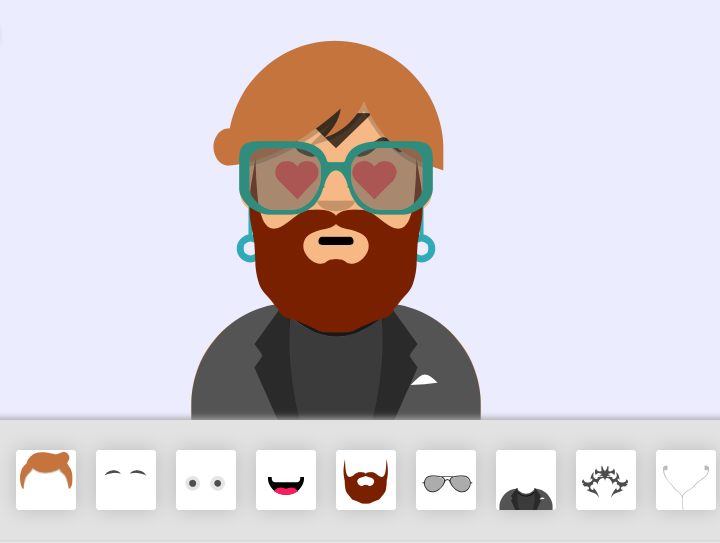
Avatar Maker
I highly recommend checking out Avatar Maker by clicking here!!!
Thanks to Larry Ferlazzo's blog for the tip.
Wednesday, March 24, 2021
SplashLearn
SplashLearn is a wonderful, super easy-to-use, free all-in-one online Math platform for grades K-5. SplashLearn is an ideal learning tool to use for teachers and parents because of the educational portal. This portal/dashboard allows educators/parents to create and manage student accounts, track/manage progress, generate detailed reports that can emailed, and even set daily schedules. Being online, SplashLearn is ideal for Remote/Distance Learning and uses Game Based Learning to help students learn and reinforce their basic Math skills, such as: addition, multiplication, and more. Also, SplashLearn has lots of different features where students can play or practice a specific skill or follow a "set" learning path where students complete games and levels collecting coins and gaining stars (similar to mobile games) on how well they completed the skill.
Finally, SplashLearn makes it easy for educators to assess students and differentiate instruction. Students can even use SplashLearn for Self Paced Learn, making it a great way for students to strengthen their Math skills.
I highly recommend checking out SplashLearn by clicking here!!!
For a more detailed review check out Kleinspiration.
*SplashLearn is an advertiser of Technology Tidbits.
GameChangineer
program/code in a simple and unique way. The way GameChangineer works is simply by typing in what you want to happen in the game or by thinking/typing out loud. Students will begin to use their computational thinking and sequential skills to develop a game. Also, this is a great way to integrate STEM into the classroom and focus on essential skills such as: logical thinking, problem solving, and more. Best of all, GameChangineer works in real-time and will help offer suggestions/auto correct what part of your text is wrong and how to correct it so your game will work. There are even lesson plans to help educators use GameChangineer in the classroom. Finally, students can test out their game and see how games such as Pacman and Space Invaders work.
I highly recommend checking out GameChangineer by clicking here!!!
Monday, March 15, 2021
Socrates
Many schools are now realizing they do not have the tools in place so kids can continue to learn while schools are closed. Socrates personalized learning for the students so they are progressing automatically, and provides teachers with tools to monitor progress and assign topics. Teachers can control the learning remotely or just allow Socrates to adjust automatically - making it a perfect tool for teachers with closed classrooms.
Socrates is an innovate new site where educators can seamlessly differentiate instruction for each student through a unique game based learning system. This is done through fun and engaging learning games w/ educational portal where teachers can track and monitor student progress, assign educational videos, use a digital badge system, testing, benchmarking, and much much more.CurrikiStudio
I highly recommend checking out CurrikiStudio by clicking here!!!
Thanks to Larry Ferlazzo's excellent blog for the tip!