Showing posts with label remote learning. Show all posts

Saturday, November 27, 2021

Otus for Remote Learning


Otus is an ideal tool for Remote Learning w/ schools being closed.  Their learning platform makes it easy for educators to build dynamic engaging lessons, deliver instruction, and then assess student learning.

Otus is a all-in-one mobile learning solution for schools that combines the best features of a: learning management system, data management system, and more.  The sleek new design, allows for easier functionality, a brighter customizable color interface, and real-time analytics and third party integration (i.e. Khan Academy), and of course Otus Worksheets.

Below is a brief demo...


I highly recommend checking out Otus by clicking here!!!

For more information check out Otus on Technology and Learning.

*Otus is an advertiser of Technology Tidbits.

Wednesday, November 10, 2021

Socrates

Socrates personalized learning for the students so they are progressing automatically, and provides teachers with tools to monitor progress and assign topics.  Teachers can control the learning remotely or just allow Socrates to adjust automatically - making it a perfect tool for teachers with closed classrooms.  

Socrates is an innovate new site where educators can seamlessly differentiate instruction for each student through a unique game based learning system.  This is done through fun and engaging learning games w/ educational portal where teachers can track and monitor student progress, assign educational videos, use a digital badge system, testing, benchmarking, and much much more.


Below is a brief demo...


I highly recommend checking out Socrates by clicking here!!!

*Socrates is an advertiser of Technology Tidbits.

Tuesday, November 2, 2021

iCivics


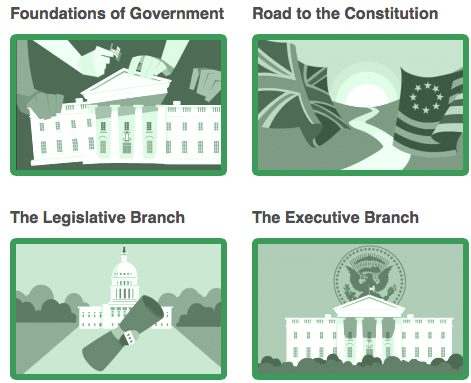
iCivics is a fantastic site for learning about Civics through Game Based Learning.  Best of all, iCivics has an educational portal that allows educators to create and manage student accounts.  Also, teachers can create assignments such as games/webquests and track student performance w/ detailed reports.  Finally, a educator can create a forum or message board to engage students in online discussions and send out class announcements.

Here is a bit more on iCivics features...

  • Lessons: Print-and-go lesson plans make civic learning fun, relevant, and easy. Lessons may include PowerPoints, and ALL are aligned to state standards. 
  •  Webquests: Our webquests help students connect civics concepts to the real world with readings and questions that link to specific web resources. Webquests can be used on individual computers or by the whole class using a projector or a smart board 
  • Games: Expand the learning experience for your students by putting them in the action. Each game is accompanied by a teacher guide with tips for game play, pre– and post-game discussion questions and ideas for additional activities. 
  •  Drafting Board: Guide your students through the process of producing a clear and polished argumentative essay. This blended learning tool brings the skills of writing persuasively together with civic topics that matter to your students. 
I highly recommend checking out iCivics by clicking here!!!

For a more detailed review check out Graphite.

For my Pinterest board on Game Based Learning click here.


Friday, October 29, 2021

SplashLearn


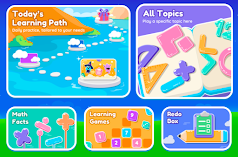
SplashLearn is a wonderful, super easy-to-use, free all-in-one online Math platform for grades K-5.  SplashLearn is an ideal learning tool to use for teachers and parents because of the educational portal.  This portal/dashboard allows educators/parents to create and manage student accounts, track/manage progress, generate detailed reports that can emailed, and even set daily schedules.  Being online, SplashLearn is ideal for Remote/Distance Learning and uses Game Based Learning to help students learn and reinforce their basic Math skills, such as: addition, multiplication, and more.  Also, SplashLearn has lots of different features where students can play or practice a specific skill or follow a "set" learning path where students complete games and levels collecting coins and gaining stars (similar to mobile games) on how well they completed the skill.

Finally, SplashLearn makes it easy for educators to assess students and differentiate instruction.  Students can even use SplashLearn for Self Paced Learn, making it a great way for students to strengthen their Math skills.


I highly recommend checking out SplashLearn by clicking here!!!

*SplashLearn is an advertiser of Technology Tidbits.


Monday, October 25, 2021

Otus


Otus is an ideal tool for Remote Learning w/ schools being closed.  Their learning platform makes it easy for educators to build dynamic engaging lessons, deliver instruction, and then assess student learning.

Otus is a all-in-one mobile learning solution for schools that combines the best features of a: learning management system, data management system, and more.  The sleek new design, allows for easier functionality, a brighter customizable color interface, and real-time analytics and third party integration (i.e. Khan Academy), and of course Otus Worksheets.

Below is a brief demo...


I highly recommend checking out Otus by clicking here!!!

For more information check out Otus on Technology and Learning.

*Otus is an advertiser of Technology Tidbits. 

Tuesday, September 14, 2021

SplashLearn


SplashLearn is a wonderful, super easy-to-use, free all-in-one online Math platform for grades K-5.  SplashLearn is an ideal learning tool to use for teachers and parents because of the educational portal.  This portal/dashboard allows educators/parents to create and manage student accounts, track/manage progress, generate detailed reports that can emailed, and even set daily schedules.  Being online, SplashLearn is ideal for Remote/Distance Learning and uses Game Based Learning to help students learn and reinforce their basic Math skills, such as: addition, multiplication, and more.  Also, SplashLearn has lots of different features where students can play or practice a specific skill or follow a "set" learning path where students complete games and levels collecting coins and gaining stars (similar to mobile games) on how well they completed the skill.

Finally, SplashLearn makes it easy for educators to assess students and differentiate instruction.  Students can even use SplashLearn for Self Paced Learn, making it a great way for students to strengthen their Math skills.


I highly recommend checking out SplashLearn by clicking here!!!

*SplashLearn is an advertiser of Technology Tidbits.


Monday, May 3, 2021

Buncee

Buncee, is one of the most versatile learning tools around for: project base learning, digital storytelling, scrapbooking, and much much more, just a new feature that makes it easy for teachers to assess student's virtual assignments and performance.  The way this is done is that an educator can now add free response questions or multiple choice questions to assess a student's learning.  Also, a teacher can generate a detailed report making it easy to differentiate instruction.

Click here for more info on how to assess student's performance.


I highly recommend checking out Buncee for Remote Learning by clicking here!!!

*Buncee is an advertiser of Technology Tidbits.

Monday, April 12, 2021

Circly


*Circly recently created some templates that are ideal for education.  For example, the image above shows a template on what student's will be doing when they are finished w/ school. 

Circly is a wonderful new graphic organizers that educators can use to brainstorm, manage tasks, create collaborative group projects, Venn diagrams and more.  Circly, is uses a drag-n-drop interface making it easy to use as well as lets the user change colors of circles to maximize data points.  Finally, the most unique feature of Circly lets users collaborate in real-time w/ built-in video caller lets user work in groups remotely.  This is a great feature for educators looking to do more group
projects as well work w/ peers remotely.

*Circly is one of the 50 nominated for the Blue Tulip Awards Education and Work Section in the Netherlands, and one of the Top Sites/Apps of 2020 in Technology & Learning magazine.

Below is brief demo...


I highly recommend checking out Circly by clicking here!!!

Circly's latest press release details how they can help classrooms get over the COVID-19 pandemic.

Thursday, March 25, 2021

Vocab Victor Classroom


Vocab Victor the innovative mobile (iOS/Android) app for building vocabulary words/skills just released a major update for educators, their digital "classroom".  This new update offers lots of features but mainly lets teachers create classrooms where students can join and then customize and create wordlists from their curriculum to include in Vocab Victor's educational games and is WEB BASED!!!

New features...
  • Create schools and classes
  • Invite students to join your classes from inside the Vocab Victor app!
  • Create word lists based on what you think your students most need to learn!
  • Assign the lists to your students!
  • Word list words will appear in Vocab Victor's word learning games automatically! Students will learn words from a combination of matching games, associations, word puzzles, and definition review!
  • Monitor your students' progress so you know which words they've mastered!
  • Encourage friendly competition with our new class leaderboard!

Vocab Victor uses "game based learning" to help students develop their vocabulary through 4 different styles of games through 11 levels.  These games offer high replay as well as different varieties of game play, such as: matching, sorting, targeting, and more.  Best of all, Vocab Victor assesses and adapts words to each student's vocabulary level in real-time and is ideal for ESL/ELL.

Vocab Victor Web app... https://app.vocabvictor.com/

Below is a brief demo...


I highly recommend checking out Vocab Victor by clicking here!!!

Download Vocab Victor for free here!!!

*Vocab Victor is an advertiser of Technology Tidbits.

Thursday, March 11, 2021

Otus


Otus is an ideal tool for Remote Learning w/ schools being closed.  Their learning platform makes it easy for educators to build dynamic engaging lessons, deliver instruction, and then assess student learning.

Otus is a all-in-one mobile learning solution for schools that combines the best features of a: learning management system, data management system, and more.  The sleek new design, allows for easier functionality, a brighter customizable color interface, and real-time analytics and third party integration (i.e. Khan Academy), and of course Otus Worksheets.

Below is a brief demo...


I highly recommend checking out Otus by clicking here!!!

For more information check out Otus on Technology and Learning.

*Otus is an advertiser of Technology Tidbits. 

Wednesday, March 10, 2021

Buncee for Remote Learning


Buncee, one of the most versatile learning tools around for: project base learning, digital storytelling, scrapbooking, and much much more, has just released a site for remote learning.  This is a great area for educators looking for ideas on how to help teach students remotely during school closures.  Remember, Buncee provides a digital canvas where the uses are limitless to create projects and lessons for your students.  Finally, Buncee has an abundance of resources for educators looking to get to know their students such as: meet the teacher templates, all about me posters, and more.  Click here for more info.

I highly recommend checking out Buncee for Remote Learning by clicking here!!!

*Buncee is an advertiser of Technology Tidbits.

Tuesday, March 9, 2021

Circly


*Circly's collaboration features make it an ideal tool for "remote learning" while schools are closed down due to the virus.  Students can even use it to do group projects from home.

Circly is a wonderful new graphic organizers that educators can use to brainstorm, manage tasks, create collaborative group projects, Venn diagrams and more.  Circly, is uses a drag-n-drop interface making it easy to use as well as lets the user change colors of circles to maximize data points.  Finally, the most unique feature of Circly lets users collaborate in real-time w/ built-in video caller lets user work in groups remotely.  This is a great feature for educators looking to do more group
projects as well work w/ peers remotely.

*Circly is one of the 50 nominated for the Blue Tulip Awards Education and Work Section in the Netherlands, and one of the Top Sites/Apps of 2020 in Technology & Learning magazine.

Below is brief demo...


I highly recommend checking out Circly by clicking here!!!

Circly's latest press release details how they can help classrooms get over the COVID-19 pandemic.

Monday, February 8, 2021

Vocab Victor Classroom


Vocab Victor the innovative mobile (iOS/Android) app for building vocabulary words/skills just released a major update for educators, their digital "classroom".  This new update offers lots of features but mainly lets teachers create classrooms where students can join and then customize and create wordlists from their curriculum to include in Vocab Victor's educational games and is WEB BASED!!!

New features...
  • Create schools and classes
  • Invite students to join your classes from inside the Vocab Victor app!
  • Create word lists based on what you think your students most need to learn!
  • Assign the lists to your students!
  • Word list words will appear in Vocab Victor's word learning games automatically! Students will learn words from a combination of matching games, associations, word puzzles, and definition review!
  • Monitor your students' progress so you know which words they've mastered!
  • Encourage friendly competition with our new class leaderboard!

Vocab Victor uses "game based learning" to help students develop their vocabulary through 4 different styles of games through 11 levels.  These games offer high replay as well as different varieties of game play, such as: matching, sorting, targeting, and more.  Best of all, Vocab Victor assesses and adapts words to each student's vocabulary level in real-time and is ideal for ESL/ELL.

Vocab Victor Web app... https://app.vocabvictor.com/

Below is a brief demo...


I highly recommend checking out Vocab Victor by clicking here!!!

Download Vocab Victor for free here!!!

*Vocab Victor is an advertiser of Technology Tidbits.

Wednesday, January 27, 2021

Socrates

  Many schools are now realizing they do not have the tools in place so kids can continue to learn while schools are closed.  Socrates personalized learning for the students so they are progressing automatically, and provides teachers with tools to monitor progress and assign topics.  Teachers can control the learning remotely or just allow Socrates to adjust automatically - making it a perfect tool for teachers with closed classrooms.  

Socrates is an innovate new site where educators can seamlessly differentiate instruction for each student through a unique game based learning system.  This is done through fun and engaging learning games w/ educational portal where teachers can track and monitor student progress, assign educational videos, use a digital badge system, testing, benchmarking, and much much more.


Below is a brief demo...


I highly recommend checking out Socrates by clicking here!!!

*Socrates is an advertiser of Technology Tidbits.

Monday, January 25, 2021

Otus for Remote Learning


Otus is an ideal tool for Remote Learning w/ schools being closed.  Their learning platform makes it easy for educators to build dynamic engaging lessons, deliver instruction, and then assess student learning.

Otus is a all-in-one mobile learning solution for schools that combines the best features of a: learning management system, data management system, and more.  The sleek new design, allows for easier functionality, a brighter customizable color interface, and real-time analytics and third party integration (i.e. Khan Academy), and of course Otus Worksheets.

Below is a brief demo...


I highly recommend checking out Otus by clicking here!!!

For more information check out Otus on Technology and Learning.

*Otus is an advertiser of Technology Tidbits.

BombBomb

 BombBomb is a innovative site that lets educators send video emails to their students and parents for free.  This is ideal for teachers that are teaching remotely and simple easy to do.  BombBomb is integrated into Gmail/Chrome all a user has to do is either click record or use the video web app.  This makes it easy for educators to "flip" a lesson or record a screencast for students when they can't teach "live".

I highly recommend checking out BombBomb by clicking here!!!

Thanks to award nominated educator Kelly Tenkely of iLearn Technology for the tip.

Monday, January 18, 2021

TeachVid


TeachVid is an amazing online tool for learning foreign languages.  TeachVid reminds me a tad like EDpuzzle where educators use interactive videos to assess student's learning.  Also, educators can create a "virtual" classroom and create assignments that contain: videos, worksheets, etc.  Finally, TeachVid makes it easy to flip a classroom or lesson and let student's learn at their own pace.

I highly recommend checking out TeachVid by clicking here!!!

*TeachVid is an advertiser of Technology Tidbits.

RecordCast

 RecordCast is an excellent free online tool for creating screencasts.  This is done through a very easy-to-use online video editor where a user can record either the whole screen or just a section and then edit it (i.e. Screenflow).  The video editor lets users add text, images, music, and more to create a beautiful looking finished product.  Finally, finished videos can then be shared or embedded making it ideal to introduce a topic or even remote learning.


I highly recommend checking out RecordCast by clicking here!!!

Thanks to Larry Ferlazzo's blog for the tip.

Wednesday, December 16, 2020

SplashLearn

SplashLearn is a wonderful, super easy-to-use, free all-in-one online Math platform for grades K-5.  SplashLearn is an ideal learning tool to use for teachers and parents because of the educational portal.  This portal/dashboard allows educators/parents to create and manage student accounts, track/manage progress, generate detailed reports that can emailed, and even set daily schedules.  Being online, SplashLearn is ideal for Remote/Distance Learning and uses Game Based Learning to help students learn and reinforce their basic Math skills, such as: addition, multiplication, and more.  Also, SplashLearn has lots of different features where students can play or practice a specific skill or follow a "set" learning path where students complete games and levels collecting coins and gaining stars (similar to mobile games) on how well they completed the skill.

Finally, SplashLearn makes it easy for educators to assess students and differentiate instruction.  Students can even use SplashLearn for Self Paced Learn, making it a great way for students to strengthen their Math skills.


I highly recommend checking out SplashLearn by clicking here!!!

*SplashLearn is an advertiser of Technology Tidbits.


Wednesday, December 9, 2020

TypeTastic for Remote Learning


*A great way for students to practice their keyboarding/typing skills while school is doing Remote Learning.

TypeTastic is an excellent K-12 site for students learning how to Type/Keyboard.  TypeTastic's School Edition has an educational portal that allows educators to track, monitor, and assess student progress.  This is a fun and great way to integrate technology into a classroom's curriculum.  TypeTastic uses over 400 innovative games, activities and drills to help teach and reinforce keyboarding/typing skills.

The expanded curriculum introduces students to more than 250 entertaining new keyboarding activities that move from locating letters to fluent typing in four fun steps:
  1. Explore the Keyboard: Unique keyboard visualization splits the letters into nine color-coded groups so students see the keyboard like a map and can quickly find the correct letters. 
  1. All Fingers Aboard: These games are designed to challenge kids to learn the fundamentals of typing. All sections are centered on finger movement, often first separated into either right- or left-hand activities, followed by more challenging games that use both hands.
  1. Ready, Set, Type!: Keyboarding activities take kids on an adventure through underwater coral reefs, thick jungle vegetation, and serene beach vistas to collect words and letters, with the goal of typing simple words and sentences. 
  1. Master Those Keys: In the final step, students dig into the secrets of fluent typing, challenging themselves with more complex words, building up their typing speed, and discovering numbers and symbols.
Below is a brief demo...


I highly recommend checking out TypeTastic!!!

For more information from their blog click here.