
I highly recommend checking out Sketch Nation Lesson Plans by clicking here!!!
Below is a brief demo...
*Sketch Nation is an advertiser of Technology Tidbits.
 CodeCombat is a fantastic way for educators to teach coding/programming in their classroom. Code Combat is an easy-to-use learning tool that lets teachers integrate STEM and project based learning by playing through their innovative game. This is done by typing code (not drag-n-drop blocks) to learn, html, CSS, and more.
 Buncee is the award winning learning tool that provides a digital canvas for students to create amazing projects, presentations, and much much more. Educators have been using Buncee in a wide variety of ways through their educational portal "Buncee Classroom" to create virtual classrooms for students to complete assignments, take quizzes, etc. Best of all, Buncee Classroom lets educators track students, assign quizzes, and even differentiate/assess instruction. Finally, w/ the vast amount resources, lesson plans, templates, and tutorials, teachers can easily integrate Buncee into any
  hyperPad is an excellent iOS app for educators to use to introduce students to programming/coding. This is done in the familiar to use drag-n-drop interface where students can easily create games, presentations, banners, and more. hyperPad also has an educational kit which is ideal for integrating STEM into the classroom.
 Storyboard That the innovative educational tool that teachers everywhere are using in a variety of ways (i.e. digital storytelling, project based learning, graphic organizers, etc) just released a bunch of new clip art for their storyboards. Users can now find new characters, scenes, items, and more by clicking here.
 Projector Screen Store is a great site for educators or parents looking to find screens, projectors, cables, and more for home or their classroom. Also, this is an ideal place to find good deals and other resources such as: how to build a home theater or how a green screen works.
 Motion Comics is a nice site for digital storytelling that I just found out about from Larry Ferlazzo's blog. Motion Comics lets users upload images and audio files to create a stunning digital comic. Best of all, a user can publish a finished comic via link or generate an embed code making it ideal for education. While still early, Motion Comics looks to be a good tool for digital storytelling.
 Pixorize is a nice site for US History students that I just learned about from Larry Ferlazzo's excellent blog. Pixorize is an innovative that uses pictures to remember facts (i.e. similar to ThingLink). This is done by linking images together w/ facts in a comprehensive visual flow.
 Answerables the innovative educational tool that combines the best features of game based learning w/ a learning management system has just released their free iPad app. Answerables is being used by educators in a variety of ways from collaborating w/ other classes, to browsing the web, all in a secure 3D virtual environment.
 Night Zoopkeeper is an excellent new site for students to help them w/ their Writing skills through fun interactive lessons/competition. Also, it has an educational portal that allows educators to: assign lessons, track student progress, and assess their work in real-time. This makes it easy for teachers to differentiate instruction and implement project based learning in their classroom.
 Studium is a excellent iOS app for making flashcards. Studium is a great learning tool to create engaging flashcards that helps a student study by including: images, audio, drawing, and more. Best of all are the numbers of ways a user can use Studium to create quizzes to study their topic, such as: multiple choice, fill in the blank, T/F, and much much more.
 *Be Sure to check out the educational activities on Earth Day.
 Typing Agent is an excellent web based Typing/Keyboarding for students grades K-12. Also, Typing Agent has lots of innovative features such as: multi-player games (i.e. K2 Mountain), aligned to Common Core Standards, certificates, type to code, and much more. Best of all, is the educational portal that allows parents and teachers to track/monitor student progress and generate detailed
  Math Rescue is a fun iOS game for grades 3rd-5th learning the concepts of Rounding/Estimation. This is done by running around a forest and putting out fires to save the trees and bridge while rounding to the nearest number.
 Owl Eyes is an innovative site that lets teachers create "classrooms" where their students can read and interact w/ texts. Student's are able to select through a wide variety of literature and then annotate the text. This is helpful as they can take notes and pickup right where they left off when reading. Best of all, the teacher tools allows educators to create quizzes to assess how students are doing and they can even track/manage their student accounts. Educators are using Owl Eyes in a number of different ways such as: differentiating instruction or flipping a classroom.
 "A social network is a social structure made up of individuals (or organizations) called "nodes," which are tied (connected) by one or more specific types of interdependency, such as friendship, kinship, common interest, financial exchange, dislike, or relationships of beliefs, knowledge or prestige. (Wikipedia)" Since I last posted on Social Networks over a year ago, a number of new ones have been introduced that can be a huge benefit to education. With that being said, I decided to list my favorite networks for education that targets technology literacy.
 NameCoach is a wonderful web service that educators are using to learn student's names and pronounce them correctly. This is especially useful w/ commencement/graduation ceremonies on the horizon. The way this works is simple as a teacher creates a name/web page and then has the student's speak their names. The audio gets embedded into a page and a user can access them all on one page at anytime. Also, NameCoach makes it very easy to share recordings and keep track of student's name/email. It's easy, accurate, and 100% safe for schools to use.
 Spin Spell is a fun iOS game for Spelling that reminds me a lot of Marble Madness. This game has users trying to spelling words while controlling a ball to roll over the correct letters. Spin Spell has over 25 levels and over 30 spelling lists for students to play through. Best of all, educators can import their own spelling lists to help students practice their words from class.
 In today's classroom STEM is a vital topic covered universally. With that being said, more and more students are being introduce to coding and programming earlier then ever before. Best of all, new technology and apps makes it easier and easier for students to learn these useful skills. Below is a list of some of the best resources for students and educators looking to learn how to program and code.
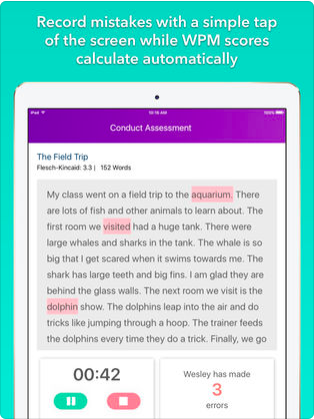 ThinkFluency is an innovative new iOS app that lets teachers assess a student's Reading fluency in real-time. All a educator has to do after creating a account, is add students/classes, select a Reading passage or create your own, and then begin the assessment. ThinkFluency makes it super easy for the teacher to track errors by tapping a button on the screen while the student is reading. Once this is done ThinkFluency will generate a detailed report and develop a individualized instruction that can be shared w/ others. This is a great app that saves teachers time as well as helping them differentiate instruction.
 EDpuzzle is the amazing learning tool that educators everywhere are using to flip their classroom, assess student learning, differentiate instruction, and much much more. This is done by adding questions to a video and modifying it to make it work for YOU.
 Preposition Builder Master is a unique game for Language Arts/ESL students learning about