Showing posts with label Education. Show all posts

Thursday, January 5, 2012

EdReach

EdReach is a online educational magazine/blog that is a must read.  This is a nice place for people to find useful information on educational trends, technology, and create a platform for others to collaborate on.  There are also a number of shows that one can tune into to hear the latest of what's going on in education.

I highly recommend checking out EdReach by clicking here!!

Thursday, September 29, 2011

Youngzine

Youngzine is a site I just found out about from Free Technology 4 Teachers. This is an excellent site for kids/students to find out current information on the web. Here is a quote straight from their site, "Our goal is to help parents and educators create a vibrant community of globally aware young citizens in an increasingly connected world. Along with news stories written specifically with our young audience in mind, Youngzine strives to inform using fun trivia, compelling visuals and videos."

Also, there are some nice features educators get such as a classroom blog and an area to collaborate on w/ students. In this "area" a teacher can post assignments, comments, and use it for grading.

I highly recommend checking out Youngzine by clicking here!!!

Wednesday, July 6, 2011

Gnowledge: A Closer Look

Last month I had the opportunity to do a basic review of the website Gnowledge. After some collaboration and spending more time on the site, I've decided to do a more in depth review of this wonderful new teaching tool.

Gnowledge is a free site designed for creating and sharing tests. This is done in through an innovative user interface that is very easy to use. Anyone familiar w/ test creation sites or PowerGrade will feel right at home. Also, there is a definite social networking aspect that is ideal for 21st Century learning through collaboration and the sharing of tests and answers.

Another great feature of Gnowledge is how user friendly the website w/ excellent hands on tutorials and a great FAQ page. I highly recommend viewing these brief videos to get a solid understanding of what this excellent site has to offer. For example, a user has many options for editing their tests w/ features such as: privacy controls, adding images, adding text snippets, etc etc. Once these tests are created then can be shared w/ others and used to enhance learning.

However, w/ all that being said what really makes Gnowledge shine are the test activity reports. Teachers and students alike can easily view their results and see which questions they got wrong while viewing their response and the right answer. This is a very useful feature especially when doing self reflection or for self based learning.

After reading this it may sound like any other test/quiz creation site which I've blogged about before, but that's really not true. At heart this is a social network/community that is designed to enhance learning and collaboration through the creation of tests. This can be a very useful tool for educators and students to gauge their success on a given topic or subject or even practice for an upcoming exam.

Below is a great example of how this site is being used in another country...

"The best example of how Gnowledge is being used and how it transcends language and cultural barriers and education syllabuses is by a French language teacher in Mexico (a Spanish-speaking country). She uses Gnowledge (an English-language website) to produce simple tests and exercises for her students. In three months she has published 43 tests and these tests have been administered to her (and other) students 1,139 times. Scale of this magnitude does not happen in conventional classrooms or schools. (Gnowledge)"

Also, since Gnowledge is in beta there are still lots of features to come, such as timed tests and history tracking. It would be nice to see if some mobility options open up too.

New sites are popping up all the time w/ cloud computing and mobile devices leading the way. Although, not all of them have this nice polished look (especially in beta) and really get what education is all about, the way that Gnowledge does.

I highly recommend checking out Gnowledge by clicking here and see how it can work for you!!

Enhanced by Zemanta

Wednesday, March 2, 2011

Watch Know

Watch Know is a wonderful free site for finding educational videos. It has thousands of videos and categorized in every subject imaginable for education. This site is very user friendly and built around a "wiki-style" interface. This is ideal for districts that are especial worried about maintaining CIPA compliance.

I highly recommend checking out Watch Know by clicking here!!!

I'd like to thank the fellow Technology Coach Larry Armstrong for the tip on this excellent find.

Wednesday, July 7, 2010

Teachers First

Teachers First is a great resource that I just found out about from reading Alexandra Fransisco's wonderful blog, Zarco English. This is a collection of resources (sites, lesson plans, etc) organized by subject and grade level.


I highly recommend checking out Teachers First by clicking here!!

Thursday, April 29, 2010

Technology & Learning

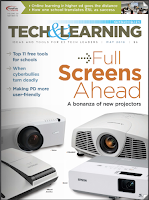
I just wanted to do a quick post on what I think is one of the better educational magazines around, and that is Technology & Learning. This magazine not only covers the latest in technology integration, but also the latest equipment in technology and how it can be used in the classroom (ex, iPad).

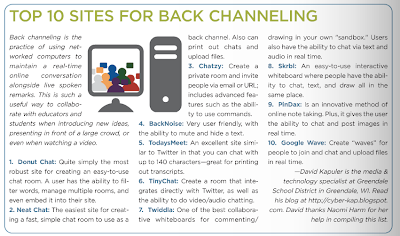
For the May 2010 issue I was lucky enough to published twice. First, for a nice blurb on the inside cover pertaining to my top 10 Digital Book Creators and inside the magazine on pg. 14 for my top 10 Back Channeling sites.

I'd like to thank all my readers and members of my PLN as none of this would've been possible if it weren't for you!!


Click here to subscribe to the online magazine.

Wednesday, April 28, 2010

Kerpoof

Kerpoof is a site that has been around for a long time, but after reading Kelly Tenkely's excellent blog post on using Kerpoof to create a storybook I decided to give it another look.

Kerpoof is a great site for educators which has a wealth of multimedia content for students. Teachers have the ability to download lesson plans, create storybooks/games, and even make a drawing or movie.


I highly recommend givine Kerpoof a try by clicking here.
Reblog this post [with Zemanta]

Wednesday, January 13, 2010

Top 50 list

Today, I received a nice little treat when a site called The Digital Learning people nominated Technology Tidbits as one of their top 50 e-Learning blogs. I'm humbled to be included in a list w/ all of these great educators.

It's been about one year since I started this blog and I am really happy w/ the progress it has made. I've been able to collaborate/meet some of the finest/nicest people around. This has never been about me, but about corresponding w/ others to learn best how to fuse technology and education. I'm very lucky to have this platform to share my thoughts/feelings/findings and continue to develop these relationships that mean so very much to me.

Thanks again for all your support!!!

http://toponlineuniversityreviews.com/2010/top-50-blogs-for-e-learning-tools-and-tips/
Reblog this post [with Zemanta]

Monday, October 12, 2009

Kubbu

Kubbu is an amazing new site that I learned about from the equally amazing blog, Websites of the Day (by Larry Ferlazzo - who has a new book out which I hope to review soon!). Kubbu reminds me an educational CMS (content management system) similar to Moodle, but much more simpler.

Kubbu is a site where teachers can register (for free) and sign up to 30 students. What makes this so great, is that the students do not need an email address to sign up, the teacher can do that form them w/ registered accounts (think Glogster). It is this educational "portal" which makes Kubbu ideal for an educational environment that has to abide by CIPPA compliance.


Teachers can use Kubbu to create: games, quizzes, and crosswords. They can create up to 15 activities that will be stored for 30 days.

I highly recommend giving Kubbu a look by clicking here.

Below is my crossword example...


Reblog this post [with Zemanta]

Tuesday, September 22, 2009

Ideas to Inspire

Ideas to Inspire is an excellent resource for teachers who want to bring technology into their curriculum. It is a collection of collaborative presentations from educators all around the world.

I really like the look and feel to this site. It is very easy to navigate through and there are a ton of resources to look through.

Below is an example of one of their presentations from their "curriculum idea" section.


Give Ideas to Inspire a try by clicking here.

For another detailed review check out the amazing Free Technology 4 Teachers blog.
Reblog this post [with Zemanta]

Tuesday, September 15, 2009

Big Huge Labs


Big Huge Labs is a site that's been around for awhile and very popular w/ the kids. It is where you can take picture templates w/ a piece cut out and add your very own. For example, I did a picture of the Joker holding a card and added my face to it. Needless to say BHL has been a sentimental favorite of mine for awhile and just got better.

Now, they have incorporated an "educational" portal so students can start using this great site. All a teacher has to do is a create a free account and "proof" of their profession (via upload) and they can start creating/uploading student accounts. No student email is needed. Once this is done, a student will get a unique ID & PW which they would use to login. A teacher can view/share/comment on any of their material at any time and monitor it. This reminds me a lot of Glogster and how they deal w/ their educational aspects.


I highly recommend giving Big Huge Labs a look especially w/ their new educational component by clicking here.


Reblog this post [with Zemanta]

Thursday, April 23, 2009

My Hero

I first heard of My Hero from Larry Ferlazzo's blog and I'm glad I did. This is such a great site for creating multi-media rich web pages which are interactive w/in the "My World" community.

Everything must pass an approval process before getting posted online so it abides by CIPA/COPPA compliance.

This is such a great place for students to express their thoughts on influential people in their lives. Plus, w/ the abundance of images/video/audio they have a vast source of information to choose from.

The really great area which every educator should check out is the Teacher's Room. In here you can find lesson plans, links, tutorials, etc.


I highly recommend you check it out by clicking here!!

Below is the actual promotional video on their site.
Reblog this post [with Zemanta]

Monday, March 16, 2009

Pixton

I learned about this comic creator site from the well-heralded Free Technology 4 Teachers blog. This site is one of many where you can create comics online and then share them (Toon Doo, etc.) However, what sets this site apart from others is the educational section to it.

There are a ton of features that is designed specifically w/ schools in mind such as: private rooms/URL's, teacher to student messaging, a "lesson bank" to share/upload lesson plans, etc etc. Another nice feature is that it will easily interact w/ any CMS. For example, you can set your page to private so nobody can get in w/out a password or you can set individual permissions for students to make sure that nothing inappropriate gets posted up online.

I would think w/ these features in place it would abide by most CIPA/COPPA compliance rules. For more info click here.

Below is a Time-Lapse video of Pixton in Action


Coming soon... Pixton comics now animated... I'll post my example soon after... click here.
Reblog this post [with Zemanta]