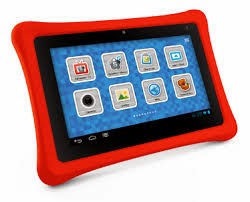
This Christmas the kids were lucky enough to receive a Nabi 2 from Santa ;-) I was very excited about this as we are predominately a iOS family and I have little experience w/ Android devices. It's unfortunate that after spending a ton of time w/ the Nabi, I have lukewarm feelings at best. The reason for this is simple, the user interface for the person setting up the Nabi is incredibly frustrating while the child interface is great.
Perhaps, it's because I'm used to working on iOS devices and the iPad but I expected the Nabi to be a lot easier to setup. My first mistake was using the Nabi before I did any updates. I highly recommend doing all updates before beginning to get familiar w/ the Nabi. The reason for this is that the user interface changes once the updates are done and it will require time to get familiar w/ the new controls. Also, while the Nabi does have a lot of great parental controls that other devices, say the iPad doesn't have, it would take a wizard to figure out how to use them. For example, I set the default browser in the parental control as a kid safe browser. This is not what I wanted, I thought it was for the browser my kids would be using not me. I could not figure out how to switch it back, even after using Google. (After searching the web, this is one of many issues people are having).
Besides the big learning curve to setup, my other big issue was the misleading information the Nabi gives out. One of the big selling points of the Nabi is that "Good Morning Red Bird" time setting animation as well as other "goodies". While I'm sure this works fine, I wouldn't know because what the Nabi doesn't tell you, is there is a fee to "unlock" that feature. And while that fee might be minimal, on principal alone I don't want to pay for it as it was supposed to be included w/ the Nabi. This goes for some of their educational curriculum as well. For example, my 8 yr old son wanted to look through some of their Science apps and when he tapped on the Science button it asked for my password as well as another minimal payment to access it (I will pay in time to "unlock" all features of the Nabi).
As for the good stuff, my kids absolutely love us the Nabi. We have plenty of iPads and iPhones in this household but all they want to play w/ is the Nabi. I love how I was able to find them some Android apps that are not available on the iPad and they really like using those. Also, the size, rub
ber protector case, and camera work nicely and make it easy for my kids to have fun and learn.
All in all, I'd have to say, I do like the Nabi, there is a big learning curve, but once you get passed that, it really is a fun/safe device for kids, and definitely worth the money.
I highly recommend checking out Nabi by clicking
here!!!
 ClassDojo is one of the most popular educational sites around, that is ideal for behavior management. This works in a very fun and engaging way that has teachers create class rosters and assign characters to them. After that, a teacher can then track how a student is doing in class by the click of a button (or tap of a screen on mobile device) to manage positive or negative behavior. This is a great site/app to motivate students and a innovative way to integrate technology into the classroom.


