Chronicle Cloud is a wonderful mobile (iOS/Google Play) app that makes it easy for teachers to assess student learning, differentiate instruction, and maximize their best teaching "strategies". This is all done through a wonderfully designed and easy-to-use app where teachers have a number of the best features from Learning Management Systems, such as: creating classes/assessments, manage/tracking students, grading, exporting/importing data, and much more. Best of all, educators can "fine-tune" their note-taking and add comments or audio notes to all data kinds of data.
I highly recommend checking out Chronicle Cloud by clicking here!!!
Pocket Grade is a simple to use iOS grading calculator that makes it easy for teachers to grade and assignment or quiz. All a user has to do is enter the number of questions and the number of wrong and answers and Pocket Grade does the rest.
I highly recommend checking out Pocket Grade by clicking here!!!
Edcite is an innovative site for creating digital assignments that I learned about from Monica Burns excellent blog. Edcite allows educators to create digital assignments/quizzes from over 60 different question types (i.e. drag-n-drop, short answer, matching, etc.). Best of all, Edcite can automatically grade student responses in real-time and generates detailed reports which allows teachers to differentiate instruction.
Below is a brief demo...
I highly recommend checking out Edcite by clicking here!!!
Quizster is a innovative site/app that I just found out about for assessing and grading students work. All a student has to do is snap a photo of their work and send it via the free mobile (iOS/Android) to their teacher. The teacher can then annotate, comment, and grade using Quizster and respond instantly to the student. All information then gets backed up to the cloud and helps decrease the frequency of lost homework. Best of all, this is a great way to gauge student's learning and differentiate instruction.
Below is a brief demo...
I highly recommend checking out Quizster by clicking here!!!
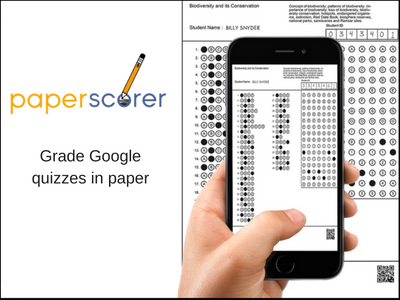
Paperscorer is a fantastic new mobile (iOS/Android, or Chrome plug-in) app that allows educators and students to assess their learning in real-time. The way this works is a teacher creates an assessment/quiz in Google Forms/Documents and then create and print out a unique answer form/bubble sheet for each student. The student then uses those forms to answer the question and take the assessment/quiz. Once the form is complete the user can then open the app on a mobile device and take pictures of the forms. Paperscorer will then grade the form/assessment and generate detailed reports. Also, Paperscorer will import student responses back to a educator's Google account. This makes it ideal for teachers to differentiate instruction.
Features of Paperscorer:
saves time grading and assessing learning/quizzes/projects
generates detailed reports
improves quality and frequency of feedback
aids in differentiating instruction
ideal for a self-guided feedback or exit slips for students
Below is a brief demo...
I highly recommend checking out Paperscorer by clicking here!!!
*Paperscorer is an advertiser of Technology Tidbits.
Paperscorer is a fantastic new mobile (iOS/Android, or Chrome plug-in) app that allows educators and students to assess their learning in real-time. The way this works is a teacher creates an assessment/quiz in Google Forms/Documents and then create and print out a unique answer form/bubble sheet for each student. The student then uses those forms to answer the question and take the assessment/quiz. Once the form is complete the user can then open the app on a mobile device and take pictures of the forms. Paperscorer will then grade the form/assessment and generate detailed reports. Also, Paperscorer will import student responses back to a educator's Google account. This makes it ideal for teachers to differentiate instruction.
Features of Paperscorer:
saves time grading and assessing learning/quizzes/projects
generates detailed reports
improves quality and frequency of feedback
aids in differentiating instruction
ideal for a self-guided feedback or exit slips for students
Below is a brief demo...
I highly recommend checking out Paperscorer by clicking here!!!
*Paperscorer is an advertiser of Technology Tidbits.
Paperscorer is a fantastic new mobile (iOS/Android, or Chrome plug-in) app that allows educators and students to assess their learning in real-time. The way this works is a teacher creates an assessment/quiz in Google Forms/Documents and then create and print out a unique answer form/bubble sheet for each student. The student then uses those forms to answer the question and take the assessment/quiz. Once the form is complete the user can then open the app on a mobile device and take pictures of the forms. Paperscorer will then grade the form/assessment and generate detailed reports. Also, Paperscorer will import student responses back to a educator's Google account. This makes it ideal for teachers to differentiate instruction.
Features of Paperscorer:
saves time grading and assessing learning/quizzes/projects
generates detailed reports
improves quality and frequency of feedback
aids in differentiating instruction
ideal for a self-guided feedback or exit slips for students
Below is a brief demo...
I highly recommend checking out Paperscorer by clicking here!!!
Chronicle is an amazing iPad app that helps educators harness and organize their best teaching methodologies. This is done by "chronicling" a students' data and using it in a beneficial and meaningful way. Chronicle is an all-in-one tool that teachers are using for classroom management, grading, assessing, and so much more.
Here are some of Chronicle's features...
1. Ideal for Reading and Writing Workshop conferring notes, but great for any subject
2. The ability to capture multiple pics, videos, and audio recordings within a note enables teachers to easily provide rich feedback, document student growth, share student achievements, and intervene for student needs.
3. The integrated grade book and traffic light system equip teachers with a means of formatively tracking unit goals, grades, report card descriptors, and more!
4. Many customizable features, including the option of associating any Common Core Standards with a class, if desired.
Below is a demo video...
I highly recommend checking out Chronicle by clicking here!!!
Chronicle is an amazing iPad app that helps educators harness and organize their best teaching methodologies. This is done by "chronicling" a students' data and using it in a beneficial and meaningful way. Chronicle is an all-in-one tool that teachers are using for classroom management, grading, assessing, and so much more.
Here are some of Chronicle's features...
1. Ideal for Reading and Writing Workshop conferring notes, but great for any subject
2.
The ability to capture multiple pics, videos, and audio recordings
within a note enables teachers to easily provide rich feedback, document
student growth, share student achievements, and intervene for student
needs.
3. The integrated grade book and traffic light system
equip teachers with a means of formatively tracking unit goals, grades,
report card descriptors, and more!
4. Many customizable features, including the option of associating any Common Core Standards with a class, if desired.
Below is a demo video...
I highly recommend checking out Chronicle by clicking here!!!
Chronicle is a innovative new iPad that is ideal for classroom management, grading, assessing, note-taking, and so much more. It is a educational tool that educators are using for harnessing their teaching best practice methodologies. It is designed for educators to "Chronicle" each student through detailed and easy to use data by allowing educators to add multimedia (i.e. audio, video, images, etc.) content to each student's progress. Teachers can customize notes and audio clips to each student, and assess students in real-time using a visual "traffic-light" design. Also, it allows educators to integrate Common Core Standards and act as a grade book w/ an abundance of export features.
I highly recommend checking out Chronicle by click here!!!
For more info check out Edshelf.
For my Pinterest board on Educational iOS Apps click here.
*Chronicle is an advertiser of Technology Tidbits.
Quick Key is an excellent free iOS app that allows educators to scan a paper test/quiz and then has the app do the grading. The way this works is by snapping a pic of the quiz/test/survey (up to 30 questions long) and then app does the grading/assessment right on the mobile device. It can then be exported into any electronic grade book and a teacher can track student/classes as well.
I highly recommend checking out Quick Key by clicking here!!!
For my Pinterest board on Educational iOS Apps click here.
iGrade for Teacher's is probably one of the most robust and easiest to use iOS apps I've seen for grading. This app allows teachers to track students: attendance, grades, calculate GPA, and more. A teacher can upload photos to each students for easy recognition and even leave voice recorded notes. Other great feature are the real-time detailed stats and reports one can get as well as Google Drive integration.
I highly recommend checking out iGrade for Teacher by clicking here!!!
For my Pinterest board on Educational iOS Apps click here.
For my Edsehlf collection on Educational iOS Apps click here.