Showing posts with label assesing. Show all posts

Monday, July 20, 2020

Spiral

Spiral is a innovative suite of educational tools for the classroom. Below is a summary of their press release...

"Spiral is a suite of free collaborative classroom tools for 1:1 devices and can be accessed anywhere, anytime with just a browser and internet connection. There are 3 apps - each designed for different types of activities. 

Quickfire is great for quizzes, class warm-ups and getting rapid responses from students. The students just need to log in on their personal devices to answer questions or use the canvas feature to annotate or draw their responses.

Discuss works well for encouraging class discussions, collaboration, and engaging the whole class. Teachers can either upload a presentation or make one from scratch before adding questions to generate relevant conversation.

Team Up is best for facilitating group work and getting students to work together. Teachers can assign students to groups, appoint a team leader, and set a problem for each group to solve. The students can then research and contribute their ideas to the team leader, who will assemble the team’s ideas in the form of a presentation. Students can go on to present their ideas on the whiteboard and critique each other’s work.

Finally, Spiral allows you to access your lesson data from your interactions which makes it much easier to carry out formative assessment and monitor student progress accurately!"


Below is a demo...


I highly recommend checking out Spiral by clicking here!!!

Monday, May 4, 2020

involve.me

involve.me is an excellent site for creating online quizzes.  What separates involve.me from other sites is the abundance of features it offers as well as how easy it is to use to create a quiz.  involve.me uses a drag-n-drop editor to create quizzes where teachers can add images or timers.  Also, a educator can select through a template or customize an already created quiz.  Finally, once the quiz is created a teacher can include comments, and the answers, so the quiz will be graded in real-time.  This is a great way for educators to assess student's learning and differentiate instruction.

I highly recommend checking out involve.me by clicking here!!!

Thanks to Larry Ferlazzo's blog for the tip.

Tuesday, July 24, 2018

Otus

Otus is a all-in-one mobile learning solution for schools that combines the best features of a: learning management system, data management system, and more.  The sleek new design, allows for easier functionality, a brighter customizable color interface, and real-time analytics and third party integration (i.e. Khan Academy), and of course Otus Worksheets.

Here is a list of some of their features...
  • Cleaner Interface: A polished, streamlined functionality lets users more easily navigate existing features including polling for instant feedback, a real-time assessment center, blogging capabilities and classroom organization tools.
  • Real-Time Analytics: A comprehensive analytics dashboard integrates a wide range of performance indicators into one place, including content from select third-party apps like Khan Academy. Teachers can link data to Common Core State Standards or integrate their own custom standards to report on. Otus tracks a variety of data like attendance, participation, student blogs, assessments and grades. In addition, teachers can also create and track meaningful behaviors like grit, leadership and staying on task through Otus ‘Recognitions’. Because Otus logs all student activity in real-time, teachers can quickly gauge their impact on student growth and provide timely, constructive feedback.
  • Toolbox:  Otus functions as an open, interoperable educational ecosystem allowing teachers to integrate and quickly access the third party apps and content that they use everyday in their classroom. Any Otus user can access free third-party apps or content. If third-party apps and content require a subscription, the subscriber must simply link their account to Otus and they will never have to sign-in to access it again.
  • Colorful Work Environments: Now teachers and students can choose from a variety of theme and background color options to create a more personalized, vibrant work environment.
  • New Lesson Builder - makes it easier then ever to create, share, and view learning activities
  • Differentiate Instruction - now easier w/ more efficient tools 
  • Side by Side - new view for for rubrics w/ documents, better organization, and synced calendars
  • New Student Profile
  • Browser Lockdown

Below is a brief demo...


I highly recommend checking out Otus by clicking here!!!
For more information check out Otus on Technology and Learning.

*Otus is an advertiser of Technology Tidbits.

Thursday, June 21, 2018

Otus

*Be sure to check out Otus at ISTE, booth #2152.

Otus is a all-in-one mobile learning solution for schools that combines the best features of a: learning management system, data management system, and more.  The sleek new design, allows for easier functionality, a brighter customizable color interface, and real-time analytics and third party integration (i.e. Khan Academy), and of course Otus Worksheets.

Here is a list of some of their features...
  • Cleaner Interface: A polished, streamlined functionality lets users more easily navigate existing features including polling for instant feedback, a real-time assessment center, blogging capabilities and classroom organization tools.
  • Real-Time Analytics: A comprehensive analytics dashboard integrates a wide range of performance indicators into one place, including content from select third-party apps like Khan Academy. Teachers can link data to Common Core State Standards or integrate their own custom standards to report on. Otus tracks a variety of data like attendance, participation, student blogs, assessments and grades. In addition, teachers can also create and track meaningful behaviors like grit, leadership and staying on task through Otus ‘Recognitions’. Because Otus logs all student activity in real-time, teachers can quickly gauge their impact on student growth and provide timely, constructive feedback.
  • Toolbox:  Otus functions as an open, interoperable educational ecosystem allowing teachers to integrate and quickly access the third party apps and content that they use everyday in their classroom. Any Otus user can access free third-party apps or content. If third-party apps and content require a subscription, the subscriber must simply link their account to Otus and they will never have to sign-in to access it again.
  • Colorful Work Environments: Now teachers and students can choose from a variety of theme and background color options to create a more personalized, vibrant work environment.

  • New Lesson Builder - makes it easier then ever to create, share, and view learning activities
  • New Student Profile
  • Browser Lockdown


Below is a brief demo...


I highly recommend checking out Otus by clicking here!!!
For more information check out Otus on Technology and Learning.

*Otus is an advertiser of Technology Tidbits.

Monday, June 11, 2018

Edji

Edji is an innovative site for annotating texts for collaborative learning that I just found out about from Larry Ferlazzo's blog.  Edji lets users read a online text and then interact w/ it by: highlighting passages, annotate w/ text, images, or emojis, and, more.  Educators can then view a "heat map" which shows highlighting being done in real-time that helps them differentiate instruction and assess student's understanding.

I highly recommend checking out Edji by clicking here!!!

Monday, October 3, 2016

Paperscorer

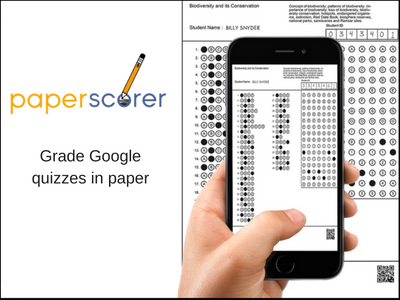
Paperscorer is a fantastic new mobile (iOS/Android, or Chrome plug-in) app that allows educators and students to assess their learning in real-time.  The way this works is a teacher creates an assessment/quiz in Google Forms/Documents and then create and print out a unique answer form/bubble sheet for each student.  The student then uses those forms to answer the question and take the assessment/quiz.  Once the form is complete the user can then open the app on a mobile device and take pictures of the forms.  Paperscorer will then grade the form/assessment and generate detailed reports.  Also, Paperscorer will import student responses back to a educator's Google account.  This makes it ideal for teachers to differentiate instruction.

Features of Paperscorer:

  • saves time grading and assessing learning/quizzes/projects
  • generates detailed reports
  • improves quality and frequency of feedback
  • aids in differentiating instruction
  • ideal for a self-guided feedback or exit slips for students
Below is a brief demo...


I highly recommend checking out Paperscorer by clicking here!!!

*Paperscorer is an advertiser of Technology Tidbits.