Showing posts with label mlearning. Show all posts

Thursday, February 20, 2014

FluencyFinder

FluencyFinder the popular iOS app for Reading Assessment/Comprehension has just gotten better w/ their recent update.  The latest update allows for educators to now search through the 1st-8th Grade Reading passages, bigger buttons on the assessing screen, easier exporting features to share assessment/comprehension reports via email, and a new sleeker redesigned look for iOS 7.  To update FluencyFinder's data is simple, just update the app, and tap the migrate button which will transfer over all students and assessment data.

FluencyFinder has been getting lots of praise from educators all over the world on how easy it is to assess a student's Reading/Comprehension level.  All a teacher has to do is find a Reading passage on FF's website and print out which one they want to test their student on.  Then it's just a tap o
f a button to start timing as the student reads while the teacher taps (+) or (-) as they make or correct mistakes.  When the student is done reading, the teacher stops the time (or choose to move on to Comprehension questions) and gets instant real-time results.

I highly recommend checking out FluencyFinder by clicking here.

Here is more about what others are saying about FluencyFinder...

"I just assessed my entire 4th grade class in half the time it usually takes.....it was so nice to not watch my stopwatch and finally be able to focus more effectively on the student's reading. My scores are right at my fingertips and I will be able to track them throughout the year. A true time saver with accurate and trackable results!! A MUST HAVE for all teachers!"
– iTunes App Store Review, 5-Star rating 

"As a lifelong advocate for a parent's role in their child's education and success, I very much appreciate this app. It gives parents a great tool for helping their child at home while supporting the role of the teacher at the same time. Thank you so much! Parents will find this very helpful!"
– iTunes App Store Review, 5-Star rating


*FluencyFinder is an advertiser of Technology Tidbits.

Monday, December 30, 2013

Nabi

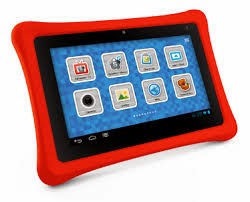
This Christmas the kids were lucky enough to receive a Nabi 2 from Santa ;-)  I was very excited about this as we are predominately a iOS family and I have little experience w/ Android devices.  It's unfortunate that after spending a ton of time w/ the Nabi, I have lukewarm feelings at best.  The reason for this is simple, the user interface for the person setting up the Nabi is incredibly frustrating while the child interface is great.

Perhaps, it's because I'm used to working on iOS devices and the iPad but I expected the Nabi to be a lot easier to setup.  My first mistake was using the Nabi before I did any updates.  I highly recommend doing all updates before beginning to get familiar w/ the Nabi.  The reason for this is that the user interface changes once the updates are done and it will require time to get familiar w/ the new controls.  Also, while the Nabi does have a lot of great parental controls that other devices, say the iPad doesn't have, it would take a wizard to figure out how to use them.  For example, I set the default browser in the parental control as a kid safe browser.  This is not what I wanted, I thought it was for the browser my kids would be using not me.  I could not figure out how to switch it back, even after using Google.  (After searching the web, this is one of many issues people are having).

Besides the big learning curve to setup, my other big issue was the misleading information the Nabi gives out.  One of the big selling points of the Nabi is that "Good Morning Red Bird" time setting animation as well as other "goodies".  While I'm sure this works fine, I wouldn't know because what the Nabi doesn't tell you, is there is a fee to "unlock" that feature.  And while that fee might be minimal, on principal alone I don't want to pay for it as it was supposed to be included w/ the Nabi.  This goes for some of their educational curriculum as well.  For example, my 8 yr old son wanted to look through some of their Science apps and when he tapped on the Science button it asked for my password as well as another minimal payment to access it (I will pay in time to "unlock" all features of the Nabi).

As for the good stuff, my kids absolutely love us the Nabi.  We have plenty of iPads and iPhones in this household but all they want to play w/ is the Nabi.  I love how I was able to find them some Android apps that are not available on the iPad and they really like using those.  Also, the size, rub
ber protector case, and camera work nicely and make it easy for my kids to have fun and learn.

All in all, I'd have to say, I do like the Nabi, there is a big learning curve, but once you get passed that, it really is a fun/safe device for kids, and definitely worth the money.

I highly recommend checking out Nabi by clicking here!!!

Sunday, December 29, 2013

Mathtastical

Mathtastical is a fun little iOS app for practicing basic Math skills (i.e. multiplication, addition, etc etc).  It has users try to solve problems while collecting gems/power-ups in as fast as time as time as possible.  Not only is this a game w/ high replay value but students can tap the hint button to help them solve a problem.

I recommend checking out Mathtastical by clicking here!!!

For my Pinterest board on Educational iOS Apps click here.
For my Edshelf collection on Educational iOS Apps click here.

Saturday, December 21, 2013

30hands

30hands is a wonderful iOS app for digital storytelling.  This is a perfect mobile learning tool that can be used in any curriculum for all grade levels.  It has a very easy to use drag-n-drop interface and allows students record their audio on top of images to create a digital story.  Once a story is created it can then be exported to a camera roll or published to 30hands educational website for sharing.

I highly recommend checking out 30hands by clicking here!!!!

For my Pinterest board on Digital Storytelling click here.
For my Edshelf collection on Digital Storytelling click here.

*30hands is an advertiser of Technology Tidbits.

Sunday, November 10, 2013

Sentence Reading Magic

Sentence Reading Magic is a wonderful free iOS app that I just found out about from Edshelf.  This is a great app for beginning Readers that helps them build sentences as well as work on their Reading skills.  For building sentences a student has to move the words into the correct position and the Reading section has users reading a sentence (2-3 words) and then tapping on a picture to see if they are correct.

I highly recommend checking out Sentence Reading Magic by clicking here!!!

Wednesday, October 16, 2013

Toonia Storymaker

Toonia Storymaker is a fantastic iPad app for digital storytelling.  This is a very user friendly app ideal for ages 4 on up.  A student has the choice of up to 20 characters to choose from to start building their story.  Also, there are lots of objects, animals, and backgrounds to choose from as well as 7 different themes of stories.  A nice feature which helps up the replay value is the ability to unlock more objects/themes/features as one starts creating a story.

I highly recommend checking out Toonia Storymaker by clicking here!!!

Below is a brief demo...


For my Pinterest board on Digital Storytelling click here.
For my Edshelf collection on Digital Storytelling click here.

Sunday, October 13, 2013

Earth 101

Earth 101 is a fantastic iPad app (free today) for learning about Geography and other facts about the world.  This is done by interacting w/ a 3D globe that contains lots of interest things such as: weather, political maps, and landmarks.  Also, there are over a 1100 geographical objects and 250 wonders of the world.

I highly recommend checking out Earth 101 by clicking here!!!

Monday, August 12, 2013

Fractions

Fractions is a nice iOS app (free today) that is good for helping students learn the different aspects of fractions.  This is done in a fun way that helps users learn how to reduce and convert mixed/improper fractions.  Also, a student can take a brief 10 question test and not only get results but see the correct answer w/ corrections.

I recommend checking out Fractions by clicking here!!!

For my Top 50 Math Sites/Apps click here.

Wednesday, July 31, 2013

Book Writer

Book Writer is a fantastic iOS app that I've had the opportunity to test out.  This app is ideal for digital storytelling and reminds me a bit of Mixbook.  What makes this app so great is how easy it is to use and the ability for students to export their digital book into an ebook (to be read in iBooks) or PDF.  Also, a user can not only upload text and images but video as well.  This is such a great way to integrate technology into a curriculum and being on an iOS device, great for mobile learning!!

I highly recommend checking out Book Writer by clicking here!!!

Below is a brief demo...


For my Pinterest board on Digital Storytelling click here.
For my Edshelf collection for Digital Storytelling click here.

Friday, July 19, 2013

Math Heroes 1 - Basic Operations

Math Heroes 1 is a excellent iOS app for students learning basic Math skills such as: addition, multiplication, division, and subtraction.  As w/ all Yogome games this app is beautiful designed filled w/ their stunning animated characters.  Math Heroes is a fighting-style game where users learn skills by solving basic equations.  As they progress further through the game not only do they unlock secret items and more levels (5 different mini-games), they learn new "fighting" moves.  This makes for a fun and engaging game w/ high replay value for kids.  Best of all the game remembers where a student leaves off and parents can monitor their kids through email updates.

I highly recommend checking out Math Heroes 1 by clicking here!!!

For my Pinterest board of Educational iOS apps click here.
For my Edshelf collection on Educational iOS apps click here.


Wednesday, July 17, 2013

Speech Therapy for Apraxia - Words

Speech Therapy for Apraxia is a Special Ed iPad app for helping children/adults w/ speech problems such as Apraxia.  This is a beautifully designed easy to use app which is to be used w/ Parents and Speech Therapist to help children develop their speech.  This is done by selecting different word groups and patterns and listening to the words and sounding them out.  As a user proceeds they progress through 9 different levels motor/speech articulation or they can choose what level they want to work.  Best of all their is progress tracking w/ detailed instructions on how best to use this app.

I highly recommend checking out Speech Therapy for Apraxia by clicking here!!!

Monday, July 15, 2013

StoryLines for Schools

StoryLines for Schools is an innovative iOS app that helps students generate their creativity as well as build up their Vocabulary and sentence building skills.  The way this works is a similar to a game of "telephone" where a person types a sentence of a story and then is followed by another drawing a picture to that sentence.  The next person then titles that image and the process continues till the storyline is complete.

I highly recommend checking out StoryLines for Schools by clicking here!!!

For my Educational iOS Apps board on Pinterest click here.
For my Edshelf collection of Educational iOS Apps click here.

Numbler

Numbler is a fun iOS app that I just found out about from Edshelf.  This app is very similar to a crossword puzzle but instead of filling in the box w/ a letter a person fills it in w/ a Math variable/number.  This is a great game for strengthen Math skills and can be played by people of all ages.  People compete as they fill in boxes w/ numbers or Math symbols it create a equation.

I highly recommend checking out Numbler by clicking here!!!

For my 50 Math Sites & Apps click here.

Monday, July 8, 2013

Sugar Shake

Sugar Shake is a fun iPad app that is ideal for Chemistry students that I found out about on Edshelf.  This educational game has users shaken the iPad to have proteins collide into sugar molecules to break them down while avoiding obstacles.  This is a very fun and addicting game w/ lots of levels to try to get through.

I recommend checking out Sugar Shake by clicking here!!!

For another excellent iPad app on Chemistry check out ChemDraw.

For my Pinterest board on Educational iOS Apps click here.
For my Edshelf collection on Educational iOS Apps click here.

Thursday, May 2, 2013

Toontastic Jr. Shrek

Toontastic Jr. Shrek is the latest spin-off of Launch Pad Toy's mega-hit, Toontastic.  This iOS app is wonderful for Digital Storytelling and can be used by students of any age level (even KDG/Preschool). What makes this app so great for education is how simple it is to use.  A kid just select's their scene, adds their characters, and then moves them around the screen while recording their voice.  Now w/ the Shrek characters this engages students even more and lets them use their creativity to create a digital story.

I highly recommend checking out Toontastic Jr. Shrek by clicking here!!!

For my Pinterest board for Digital Storytelling click here.
For my Edshelf collection for Digital Storytelling click here.

Thursday, April 25, 2013

Sight Words & Spelling w/ Pixopop HD

Sight Words & Spelling w/ Pixopop is a free today and an excellent iPad app for teaching young kids how to Read and Spell.  This is done through 3 styles of games: flashcards, word challenge (think hangman), and a basic spelling game.  What makes this great for education is that a teacher can create their own custom words list to use, and students can even select their own avatar.

I highly recommend checking out Sight Words & Spelling w/ Pixopop by clicking here!!!

For my Pinterest board on Educational iOS Apps click here.
For my Edshelf collection on Educational iOS Apps click here.

Friday, April 19, 2013

Story Wheel

Story Wheel is a fantastic iOS app for digital storytelling.  The way this works is a student spins a wheel and lands on an image.  Once this image is selected a student has 30 seconds to record their voice creating the story.  What makes this so nice is the ability to see your images on the side while recording your voice to keep track of your story.  Once a story is finished it can then be shared online or turned into an ibook.

I highly recommend checking out Story Wheel by clicking here!!!

For my Pinterest board on Digital Storytelling click here.
For my Edshelf collection on Digital Storytelling click here.

Hopscotch

Hopscotch is another free iPad app for kids to learn programming that I found about from Edshelf.  Again this app reminds me a lot of Daisy the Dinosaur and Scratch, where students can program by dragging-and-dropping blocks into order to form commands.  Once the sequence of commands is completed a user can watch as characters come to life.  A neat feature is once a student becomes more advanced they can program to have their iPad interact w/ the app by tilting or shaking.

I highly recommend checking out Hopscotch by clicking here!!!

Monday, April 15, 2013

Mystery Math Town

Mystery Math Town is a wonderful iPad app for ages 6-12 yrs old.  I tried out this app w/ my 5 & 7 yr old tonight and they absolutely loved it.  This stunning looking app immerses kids into a unique and mysterious environment.  As students travel through a house they can interact w/ the background environment while unlocking certain areas by solving equations.  While they progress further in the game students can collect gold coins to unlock an interactive gallery of townspeople.  What makes this ideal for education is the ability to create multiple user accounts, controlling game settings, and it focuses on addition, subtraction, and multiplication.

I highly recommend checking out Mystery Math Town by clicking here!!!

For my Pinterest board on Educational iOS apps click here.
For my Edshelf collection on Educational iOS apps click here

Monday, April 8, 2013

Robots for iPad

Robotos for iPad is an innovative fun app for exploring real-world robots.  This is a great app for education that allows students to explore over a 100 robots from around the world by interacting w/: images, articles, photos, videos, and more.

I highly recommend checking out Robotos for iPads by clicking here!!!

For my Educational iOS Apps Pinterest board click here.
For my Edshelf collection iOS Apps click here.