Showing posts with label powerpoint. Show all posts

Saturday, November 27, 2021

SlidesMania


SlidesMania is a fantastic site site for finding free PowerPoint and Google Slides templates for education. This is a great place to find all kind of presentations, such as: notebooks, daily planners, certificates, and much much more.  Finally, there are lots of how-to templates and walkthroughs making it ideal to introduce a topic or subject and Guided Learning.

I highly recommend checking out SlidesMania by clicking here!!!

Monday, November 15, 2021

ClassPoint

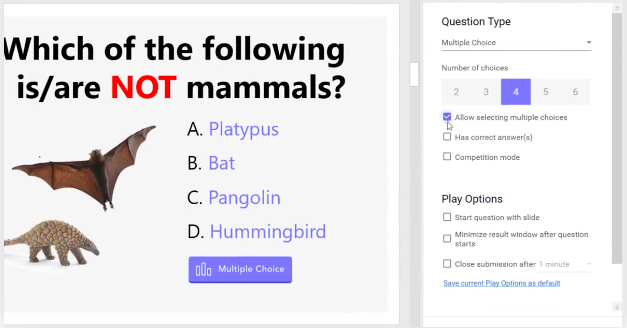
ClassPoint is a excellent learning tool that lets users take their powerpoint presentations to the next level. What makes ClassPoint such an ideal tool for teachers are the abundance of educational features such as: adding quizzes/polls, annotating slides, whiteboards, and more.  Best of all, ClassPoint makes it easy for educators to assess student learning and differentiate instruction.

I highly recommend checking out ClassPoint by clicking here!!!

For a more detailed review check out Richard Byrne's award winning blog.

Thursday, January 22, 2015

PDF to PowerPoint

PDF to PowerPoint is the free classroom productivity iOS app from Cometdocs.  This is a nice simple app to use to upload a PDF and turn it into a Powerpoint.  This is very handy for mobile learning and those teachers and students needing to convert their PDF's into presentations.  Here are some more features from their promotional email...

  1. The app can be used completely free.
  2. There is no other free PDF to PowerPoint iOS app on the market.
  3. Slides and text recognition is accurate and precise. The presentation will have the same layout as the original PDF, but will be completely editable in Microsoft PowerPoint or Google Slides.
  4. Scanned PDFs (for example ones created with a mobile scanner) are supported as well.
  5. Size doesn’t matter, large files are also supported.
  6. Conversion quality is the same for all types of user. Premium subscription is valid for a lifetime and influences only the speed of conversion delivery.

I highly recommend checking out PDF to PowerPoint by clicking here!!!

Friday, May 30, 2014

ParticiPoll

ParticiPoll is a new tool that allows a user to add an interactive poll to their PowerPoint presentations.  It's a very simple tool to use that allows up to 6 student responses as well as being able to take the poll on any device.  Best of all, the results are done in real-time and an audience can view them as well.

I recommend checking out ParticiPoll by clicking here!!!

Thanks to Richard Byrne's award winning blog for the tip.

Below is a brief demo video...

Wednesday, December 5, 2012

Vivapitch

Vivapitch is a free application-add on for Powerpoint and Android.  Basically, it replaces the need for a presenter to give handouts as Vivapitch allows users to interact w/ their presentations on a mobile device.  This is ideal for people giving presentations, keynote, or wants to engage their audience.

I recommend checking out Vivapitch by clicking here!!

Thursday, April 26, 2012

Powerpoint Palooza

PPT Palooza is a site I just found out about from David Andrade's excellent blog.  This is a great site for 100's of free Powerpoints on American and European history.  This is a great resource for History/SS teachers.

I recommend checking out Poweroint Palooza by clicking here!!!

Thursday, April 12, 2012

SlideShark

SlideShark is a free iPad app designed to allow users to edit/view/share a Powerpoint slideshow.  This is a very useful app as w/out it the old school method was to convert to a PDF or video.  The controls are simple to use such as swiping right to progress forward or left to move back.

I highly recommend checking out SlideShark by clicking here!!!

Friday, September 23, 2011

Oomfo

Oomfo is a new (beta) site for powerpoint that is a wonderful add-on. Once Oomfo is downloaded users can then create excellent looking, interactive, animated graphs.

I highly recommend checking out Oomfo by clicking here!!

Monday, May 16, 2011

Present.me

Present.me is new (beta) wonderful site for uploading powerpoint presentations then adding a narration. The finished product actually combines the two so you see the presentation and the narrator as well. When the presentation is done you can share it w/ others via a URL or embed into a site. If you upgrade your account you can then activate privacy options and others as well.

I highly recommend checking out Present.me by clicking here!!

Thanks to Richard Byrne's excellent blog for the tip.
Enhanced by Zemanta

Tuesday, February 2, 2010

AuthorStream

AuthorStream is a great site to upload/share powerpoint documents. In a way it's similar to slideshare w/ more options. Once a user uploads their slideshow, they can either embed them into their site, make them available for download, link to it directly, or even create their own "room" (think YouTube) to "house" all of their presentations.

This really is a neat site to take your powerpoint presentation to the next level.


Give AuthorStream a try by clicking here.

I highly recommend checking out Shelly Terrell's wonderful blog for more excellent ideas/resources for your classroom!!!