Showing posts with label comprehension. Show all posts

Sunday, March 15, 2020

Actively Learn

Actively Learn is a site I've covered many times in the past and is excellent for comprehension/reading where educators can take a text and make it their "own" by adding questions, assessments, polls, to assess a student's learning and differentiate instruction.

Recently, Actively Learn announced they will help w/ online learning during school closures by making their learning platform free through the end of the summer.  More from their press release...

Actively Learn can help. We’re offering our platform for free through the summer to make remote learning as strong as possible, without you needing to start from scratch. Our curriculum platform promotes student and teacher collaboration — at school and at home — with: 
  • Access to engaging content through any device (including smartphone)
  • A way for teachers to import content to use the assignments they’ve already planned for
  • Supports for all types of learners 
  • Ability to collaborate with peers and teachers
  • Easy progress monitoring and ways to provide feedback and grades
I highly recommend checking out Actively Learn by clicking here!!!

Thursday, December 5, 2019

Actively Learn

Actively Learn is a site I've blogged about in the past that is ideal for increasing reading comprehension or adding "depth" to any text.  AL reminds me a lot of EDpuzzle but instead of "making a video your own" it is "making reading material your own".  This can be done using any text and lets educators track student's learning and understanding of a passage through the use of asking questions, annotating, collaborating, and more all in real-time.  This is a great resource for teachers and easily lets them gauge a student's understanding, differentiate instruction, or even "flip" a lesson.

More updated features include:
  • Updated instruction for thousands of ELA, Science, and Social Studies texts
  • Text pairings for topics and novels that help teachers find content related to what they already teach
  • Videos that tie to academic topics, w/ embedded questions to monitor student comprehension
  • The ability for students to highlight key vocabulary right in the text and hear an entire text read aloud
  • A redesigned catalog and workspace to improve navigation and usability
Below is a brief demo video...


I highly recommend checking out Actively Learn by clicking here!!!

Sunday, August 19, 2018

Actively Learn

Actively Learn is a site I've blogged about in the past that is ideal for increasing reading comprehension or adding "depth" to any text.  AL reminds me a lot of EDpuzzle but instead of "making a video your own" it is "making reading material your own".  This can be done using any text and lets educators track student's learning and understanding of a passage through the use of asking questions, annotating, collaborating, and more all in real-time.  This is a great resource for teachers and easily lets them gauge a student's understanding, differentiate instruction, or even "flip" a lesson.

More updated features include:
  • Updated instruction for thousands of ELA, Science, and Social Studies texts
  • Text pairings for topics and novels that help teachers find content related to what they already teach
  • Videos that tie to academic topics, w/ embedded questions to monitor student comprehension
  • The ability for students to highlight key vocabulary right in the text and hear an entire text read aloud
  • A redesigned catalog and workspace to improve navigation and usability
Below is a brief demo video...


I highly recommend checking out Actively Learn by clicking here!!!

Monday, July 16, 2018

Owl Eyes

Owl Eyes is an innovative site that lets teachers create "classrooms" where their students can read and interact w/ texts.  Student's are able to select through a wide variety of literature and then annotate the text.  This is helpful as they can take notes and pickup right where they left off when reading.  Best of all, the teacher tools allows educators to create quizzes to assess how students are doing and they can even track/manage their student accounts.  Educators are using Owl Eyes in a number of different ways such as: differentiating instruction or flipping a classroom.

I highly recommend checking out Owl Eyes by clicking here!!!

Below is a brief demo...


*Owl Eyes is an advertiser of Technology Tidbits.

Monday, June 18, 2018

Owl Eyes

Owl Eyes is an innovative site that lets teachers create "classrooms" where their students can read and interact w/ texts.  Student's are able to select through a wide variety of literature and then annotate the text.  This is helpful as they can take notes and pickup right where they left off when reading.  Best of all, the teacher tools allows educators to create quizzes to assess how students are doing and they can even track/manage their student accounts.  Educators are using Owl Eyes in a number of different ways such as: differentiating instruction or flipping a classroom.

I highly recommend checking out Owl Eyes by clicking here!!!

Below is a brief demo...


*Owl Eyes is an advertiser of Technology Tidbits.

Tuesday, June 12, 2018

ThinkFluency

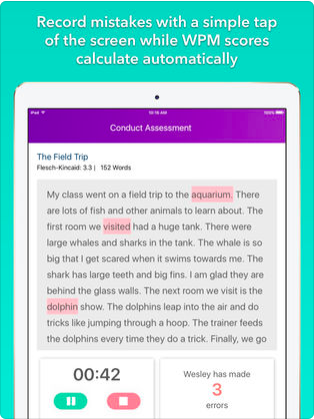
ThinkFluency is an innovative new iOS app that lets teachers assess a student's Reading fluency in real-time.  All a educator has to do after creating a account, is add students/classes, select a Reading passage or create your own, and then begin the assessment.  ThinkFluency makes it super easy for the teacher to track errors by tapping a button on the screen while the student is reading. Once this is done ThinkFluency will generate a detailed report and develop a individualized instruction that can be shared w/ others.  This is a great app that saves teachers time as well as helping them differentiate instruction.

I highly recommend checking out ThinkFluency by clicking here!!!

Saturday, April 14, 2018

Owl Eyes

Owl Eyes is an innovative site that lets teachers create "classrooms" where their students can read and interact w/ texts.  Student's are able to select through a wide variety of literature and then annotate the text.  This is helpful as they can take notes and pickup right where they left off when reading.  Best of all, the teacher tools allows educators to create quizzes to assess how students are doing and they can even track/manage their student accounts.  Educators are using Owl Eyes in a number of different ways such as: differentiating instruction or flipping a classroom.

I highly recommend checking out Owl Eyes by clicking here!!!

Below is a brief demo...


*Owl Eyes is an advertiser of Technology Tidbits.

Tuesday, April 10, 2018

ThinkFluency

ThinkFluency is an innovative new iOS app that lets teachers assess a student's Reading fluency in real-time.  All a educator has to do after creating a account, is add students/classes, select a Reading passage or create your own, and then begin the assessment.  ThinkFluency makes it super easy for the teacher to track errors by tapping a button on the screen while the student is reading. Once this is done ThinkFluency will generate a detailed report and develop a individualized instruction that can be shared w/ others.  This is a great app that saves teachers time as well as helping them differentiate instruction.

I highly recommend checking out ThinkFluency by clicking here!!!

Wednesday, January 17, 2018

Actively Learn

Actively Learn is a site I'm just finding out about that is an excellent resource for educators looking to increase comprehension and "depth" of any text.  AL reminds me a lot of EDpuzzle but instead of "making a video your own" it is "making reading material your own".  This can be done using any text and lets educators track student's learning and understanding of a passage through the use of asking questions, annotating, collaborating, and more all in real-time.  This is a great resource for teachers and easily lets them gauge a student's understanding, differentiate instruction, or even "flip" a lesson.

Below is a brief demo video...


I highly recommend checking out Actively Learn by clicking here!!!
Monday, January 15, 2018

Owl Eyes

Owl Eyes is an innovative site that lets teachers create "classrooms" where their students can read and interact w/ texts.  Student's are able to select through a wide variety of literature and then annotate the text.  This is helpful as they can take notes and pickup right where they left off when reading.  Best of all, the teacher tools allows educators to create quizzes to assess how students are doing and they can even track/manage their student accounts.  Educators are using Owl Eyes in a number of different ways such as: differentiating instruction or flipping a classroom.

I highly recommend checking out Owl Eyes by clicking here!!!

Below is a brief demo...


*Owl Eyes is an advertiser of Technology Tidbits.

Wednesday, October 4, 2017

Owl Eyes

Owl Eyes is an innovative site that lets teachers create "classrooms" where their students can read and interact w/ texts.  Student's are able to select through a wide variety of literature and then annotate the text.  This is helpful as they can take notes and pickup right where they left off when reading.  Best of all, the teacher tools allows educators to create quizzes to assess how students are doing and they can even track/manage their student accounts.  Educators are using Owl Eyes in a number of different ways such as: differentiating instruction or flipping a classroom.

I highly recommend checking out Owl Eyes by clicking here!!!

Below is a brief demo...


*Owl Eyes is an advertiser of Technology Tidbits.

Tuesday, August 1, 2017

Owl Eyes

Owl Eyes is an innovative site that lets teachers create "classrooms" where their students can read and interact w/ texts.  Student's are able to select through a wide variety of literature and then annotate the text.  This is helpful as they can take notes and pickup right where they left off when reading.  Best of all, the teacher tools allows educators to create quizzes to assess how students are doing and they can even track/manage their student accounts.  Educators are using Owl Eyes in a number of different ways such as: differentiating instruction, flipping a classroom, and more.

For back to school, Owl Eyes have added more texts, created a more user friendly interface, and added more resources for educators.

Finally, they are giving away 10 free 60-minute lessons for those teachers that sign up by the end of August.

I highly recommend checking out Owl Eyes by clicking here!!!

Below is a brief demo...


SaveSaveSaveSave

Thursday, June 29, 2017

ToonSpaghetti Story Lab: Classroom Edition

ToonSpaghetti Story Lab: Classroom Edition is a educational iOS app that I just found out about from Class Tech Tips.  ToonSpaghetti is a fantastic app for kids ages 5 and older and ideal for digital storytelling and project based learning.  Also, ToonSpaghetti is aligned to Common Core Standards, lets users solve word games (to build vocabulary), and add music to animations/stories.
Best of all, a user can record their own voice to create dynamic and engaging stories.

I highly recommend checking out ToonSpaghetti by clicking here!!!

Friday, May 19, 2017

Lyrics2Learn

Lyrics2learn uses Hip-hop and rock to boost K-5th grade reading fluency, and offers 4 levels of interactive comprehension practice.  Kids read along with rappers and rockers during each lesson.  Kids memorize quickly while learning about about character building, history, science, and grammar and boost reading skills.  Each fluency video is followed by 4 levels of interactive comprehension.  Lyrics2learn gives students and educators immediate feedback and tracks data.

L2L offers free, full access trials to teachers, parents and entire schools.

I highly recommend checking out Lyrics2Learn by clicking here!!!

Below is a demo video...


Thursday, May 11, 2017

WriteReader News

I've covered WriteReader in the past as an excellent learning tool to help students grades K-4 w/ their Reading and Writing.  Recently, they have partnered w/ Sesame Street to allow students to create digital stories using their favorite characters (i.e. Big Bird, Grover, etc.).  Once a student logs in they will see up to 20 characters to choose from to create their very own digital book.

I highly recommend checking out WriterReader by clicking here!!!

Thursday, March 9, 2017

Listenwise

Listenwise is a interesting site that takes the "listening" skill to the next level.  This is done by listening to a library of over a 1000 curated stories w/ reading a long to increase comprehension.  Best of all, are the educational tools and activities/quizzes that educators can use to track student progress and differentiate instruction.

I highly recommend checking out Listenwise by clicking here!!!

Below is a demo video...

Tuesday, March 7, 2017

Readocity

Readocity is a free educational app (Google/iOS) for helping students increase their joy of Reading.  This is a collaborative parent/teacher app that educators are using to communicate Reading lists/activities to home.  Readocity lets users leave text messages about their reading choice, create Reading logs, and even differentiate instruction.  Finally, Readocity curates and recommends Reading choices that are age appropriate.

Below is a brief demo video...


I highly recommend checking out Readocity by clicking here!!!

Friday, November 25, 2016

WriteReader

WriteReader is an excellent learning tool for grades K-4 to help students w/ their Reading and Writing.  This is done through a educational portal where educators can create an account and then share a unique code for students.  Also, this portal allows for teachers to manage/monitor student accounts and track progress.  Best of all, there are lots of resources for educators such as: tutorials, lesson plans aligned to Common Core Standards, and more.

WriteReader also allows students to create digital books in a safe environment (i.e. comment moderation, Google Safe image search, etc) and share them w/ others.

I highly recommend checking out WriteReader by clicking here!!!

For WriteReader lesson plans click here.

Below is a brief demo...

Monday, October 24, 2016

Owl Eyes

Owl Eyes is an innovative site that lets teachers create "classrooms" where their students can read and interact w/ texts.  Student's are able to select through a wide variety of literature and then annotate the text.  This is helpful as they can take notes and pickup right where they left off when reading.  Best of all, the teacher tools allows educators to create quizzes to assess how students are doing and they can even track/manage their student accounts.  Educators are using Owl Eyes in a number of different ways such as: differentiating instruction or flipping a classroom.

I highly recommend checking out Owl Eyes by clicking here!!!

Below is a brief demo...


*Owl Eyes is an advertiser of Technology Tidbits.

Wednesday, September 28, 2016

Owl Eyes

Owl Eyes is an innovative site that lets teachers create "classrooms" where their students can read and interact w/ texts.  Student's are able to select through a wide variety of literature and then annotate the text.  This is helpful as they can take notes and pickup right where they left off when reading.  Best of all, the teacher tools allows educators to create quizzes to assess how students are doing and they can even track/manage their student accounts.  Educators are using Owl Eyes in a number of different ways such as: differentiating instruction or flipping a classroom.

I highly recommend checking out Owl Eyes by clicking here!!!

Below is a brief demo...


*Owl Eyes is an advertiser of Technology Tidbits.