Showing posts with label collaboration. Show all posts

Sunday, November 14, 2021

SpiderScribe


SpiderScribe is a state-of-the-art mind mapping/brainstorming tool that is ideal for education.  SpiderScribe is a great tool that educators can use for project based learning, group collaboration, and much much more.  Best of all, SpiderScribe lets users link a wide variety of items into their "maps" such as: files, calendars, notes, etc, and can easily be shared and generate detailed reports.

I highly recommend checking out SpiderScribe by clicking here!!!

For a more detailed review check out Technology & Learning by clicking here.

Wednesday, December 12, 2018

Project Pals

Project Pals is a innovative all-in-one collaborative learning platform ideal for project based learning
that K-12 teachers are using for any subject or curriculum.  Through the Project Pals platform educators will track, monitor, and guide student progress while students work collaboratively.  This is all done through a easy-to-use visual interface that helps students organize and collaborate on their projects.  Project Pals is a great tool for educators to not only use for group projects but to asses
student learning as well.

Finally, Project Pals has a wide range of resources for educators such as: lesson plans, eBooks, and more.  Teachers can find a vast array of common core aligned already created projects to help integrate Project Pals intro the classroom.  Educators can even use existing rubrics or create their own to use w/ detailed reports generated by Project Pals making it easy to differentiate instruction.

Below is a brief demo...


I highly recommend checking out Project Pals by clicking here!!!

Teachers can sign up for a free license by clicking here!!!

For another detailed review check out Class Tech Tips by clicking here.

Tuesday, October 9, 2018

Project Pals

Project Pals is a innovative all-in-one collaborative learning platform ideal for project based learning
that K-12 teachers are using for any subject or curriculum.  Through the Project Pals platform educators will track, monitor, and guide student progress while students work collaboratively.  This is all done through a easy-to-use visual interface that helps students organize and collaborate on their projects.  Project Pals is a great tool for educators to not only use for group projects but to asses student learning as well.

Finally, Project Pals has a wide range of resources for educators such as: lesson plans, eBooks, and more.  Teachers can find a vast array of common core aligned already created projects to help integrate Project Pals intro the classroom.  Educators can even use existing rubrics or create their own to use w/ detailed reports generated by Project Pals making it easy to differentiate instruction.

Below is a brief demo...


I highly recommend checking out Project Pals by clicking here!!!

Teachers can sign up for a free license by clicking here!!!

Saturday, May 19, 2018

Peergrade

Peergrade is an all-in-one peer assessment platform.  The way this works is an educator creates an assignment and rubric while students upload their work to Peergrade.  Peergrade then automatically and distributes that work to other students.  The students then anonymously evaluate and assess their peer's work while providing constructive feedback.  This helps students learn by "grading" and become effective communicators.

Below is a brief demo...


I highly recommend checking out Peergrade by clicking here!!!

Tuesday, February 27, 2018

ClassPulse

ClassPulse is a new mobile app (iOS/Android) for assessing students, collaborating, and gaining feedback, that I just found out about from Richard Byrne's amazing blog.  It's an easy-to-use app that lets educators create a class and then have their students join via unique code.  Once the class is created students and teachers can then message each other and collaborate back and forth.  Also, there is a nice polling features that students can vote on.

I highly recommend checking out ClassPulse by clicking here!!!

Tuesday, August 15, 2017

Vidhub

Vidhub is a cool site that I just found out about for reviewing and collaborating on digital videos.  Vidhub allows users to upload any kind of digit video and then collaborate on it in real-time.  This is done through easy-to-use tools that lets users add time-stamps, collaborate, edit revisions, send reminders, and more.

I highly recommend checking out Vidhub by clicking here!!!

Tuesday, August 8, 2017

StoryCraft

StoryCraft is a fun free iOS app that I found out about from the amazing educator, Shelly Terrell.  This is a innovative way for students to collaborate on a story in the familiar "choose-your-own-adventure" style.  Users can create a story w/ text and images and invite other students to add to their story.  It kind of reminds me of poor man's version of BoomWriter w/out all the voting and bells and whistles.

I highly recommend checking out StoryCraft by clicking here!!!


Wednesday, May 28, 2014

Been for Education

Been for Education is one of my favorite new Web 2.0 sites/companies that is perfect for Social Learning.  This is all done through a safe educational portal that allows educators to manage/create student accounts.  Been is a great way to collaborative browse the web, curate, and collaborate in a safe environment.  It kind of reminds of a cross between Symbaloo and Diigo w/ a more visual and interactive style.

Been is a great tool for Project Based or Guide Learning, and even for Flipping a classroom.  The protective "bubble" that Been wraps each web page in is a great way to make browsing the web safe (as well as a district's filter) and interactive for students.

I highly recommend checking out Been for Education by clicking here!!!

For Technology & Learning's review of Been click here.

*Been is an advertiser of Technology Tidbits.

Tuesday, March 18, 2014

Been for Education

Been the innovative site for visually bookmarking a site and collaborating has just launched a educational portal that makes it perfect for educators to use w/ their class.  This free web tool is not only ideal for social bookmarking in schools but real-time collaborative web browsing as well.  Been's new web portal now allows for educators to create student accounts, and communicate w/ them in real-time while bookmarking/browsing the web.

This is ideal for Guided Learning, Flipping a Classroom, Project Based Learning, and can be used by any subject or curriculum.  Educators can use it to create internet scavenger hunts, to research/introduce a topic, or any other number of possibilities.

The educator account is perfect for moderating student's Beens (bookmarks/collections), comments, resetting passwords, etc.  Being "housed" inside of an educational portal allows for educators to see public Beens but only allows for students to see those of their teacher.  Teachers can also collaborate w/ their peers to allow for collective Beens that can be use for group projects.

Finally, the ability to collaboratively surf the web when being on the same page allows for students/educators to share comments and surf together to guide instruction.  Also, educators can assess students who have questions when surfing the web or researching a topic.

I highly recommend checking out Been for Education by clicking here!!!

For my Pinterest board on Web 2.0 click here.

Below is a demo video on collaboratively surfing on Been....

4. Surf Together in Class! from Been on Vimeo.

Friday, March 23, 2012

Gnowledge

For those looking to create online quizzes, collaborate, and more... Gnowledge is the site for you.  This is a great place for educators to find or create tests/quizzes and then track their students progress.  Also, they have top of the line tech support w/ excellent tutorials.

I highly recommend checking out Gnowledge by clicking here!!
 
Gnowledge is a paid advertiser of Technology Tidbits.

Friday, October 29, 2010

Knowcase

Knowcase is a fun site for creating collaborative outlines. While I do like this site, I would enjoy it even more if it had more features such as adding photos or the ability to turn your outline into a diagram. That being said Knowcase is really nice when wanting to share w/ others and have them edit your outline.

Give Knowcase a try by clicking here!!


For a more detailed review check out Free Technology 4 Teachers!!
Enhanced by Zemanta

Thursday, May 13, 2010

Stixy

Stixy is a site for creating online content and collaboration in the same vein as Wall Wisher or Spaaze. Think of the page as one giant sticky note that you can edit and add all types of media.

For me personally I find that these type of sites can get visually busy real quick w/ a lot of editors.


Give Stixy a try by clicking here.

Tuesday, May 4, 2010

ReviewBasics

ReviewBasics is an excellent site for collaborating on a number of items such as video, photos, text, presentations etc. This is done w/ a very nice user interface and lets others provide feedback on all sorts of content.

I highly recommend checking out their brief 1 min demo by clicking here.


I'd like to thank the wonderful blog ZarcoEnglish for the tip!!

Monday, April 19, 2010

EdCrowd

EdCrowd is a new (alpha) site for asking questions and getting answer from other anonymous users. This site reminds a lot of Aardvark another site that offers similar type services.

However, EdCrowd does stand out a bit that the more a person answers/post questions on their site the better the chance somebody will vote on it and alter their "reputation". Think of how karma works in Plurk and you'd be on the right track. The higher a person's reputation is the more options that they have.


Give EdCrowd a try if you want a more interactive type of discussion board by clicking here.

Wednesday, April 14, 2010

draw.to

Draw.to is a great drawing collaboration site. It's very easy to use and not only can this drawing be shared via a link it has the ability to be embedded into a site as well.


Give Draw.to a try by clicking here.

Thanks to Larry Ferlazzo for the tip!!

Wednesday, December 16, 2009

VoiceThread + PLN = Magic

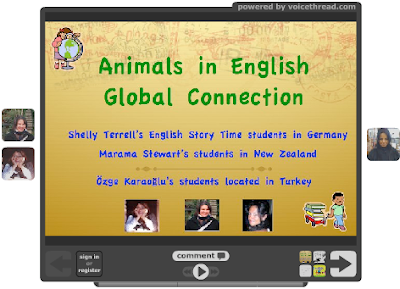
While surfing the web I come across all sorts of technology projects & ideas. At times something will catch my eye and I'll stop and take a closer look, similar to shopping for a book in a bookstore. The other day this very thing happened to me when I came across a Voicethread project. Now, this was not that unusual in itself, but like that fancy book w/ the cool looking cover, I noticed three amazing educators looking back at me (yes, it was their profile picture).


Of course, after seeing these three people who happened to be huge contributors to my PLN, I had to take a closer look. So, I hit the play button and watched as Shelly, Marama, and Ozge created that very thing that is at the heart of Web 2.0, and that's collaboration MAGIC.

I don't want to spend time explaining what this project is all about because it's not mine to tell. Shelly did an amazing job covering this already on her wonderful blog. What I find so fascinating is that these three people took that "web 2.0" technology and applied it to their teachings. What started out as a chance meeting of like-minded individuals through their PLN's, became this full fledged inspirational project that both educators and students could enjoy.

I highly recommend checking out these wonderful sites by these special educators:
Click here to view the Voicethread.

Wednesday, July 15, 2009

Slatebox

Slatebox is a new (beta) site that I read about on Richard Byrne's incredible blog. This is the ultimate tool for creating "web 2.0" style mind maps and organizational charts.

Right off that bat, you'll be impressed w/ how easy it is to login. If you have an existing Google/FB/Open ID etc. account you can log right in. If not, simply register for a new one, by giving an email address and password. Once you are in, you are treated to some very easy to follow tutorials.

Another great aspect are the different templates you can choose to create your own slate. This is done by selecting one of the themes and then editing it to meet your needs.


Finally, after you have created your slate or chart, you can collaborate w/ other users which is very easy to do using SB. Of all the "web 2.o" apps I've tried this ranks right up there w/ how user friendly it is.

Below is my sample slate...


Give Slatebox a try by clicking here.