Classmint is a site for making flashcards/study notes that I just found out about from Free Technology 4 Teachers. This is a great site that lets users create notes/cards that they can add images, audio, or annotate on. This is useful when wanting to study via a digital flashcard and memorize information.
I highly recommend checking out Classmint by clicking here!!!
For a brief demo view below...
Showing posts with label notes. Show all posts
Showing posts with label notes. Show all posts
Wednesday, September 4, 2013

Monday, January 16, 2012
Open2Go

I recommend checking out Open2Go by clicking here!!
Thursday, January 5, 2012
Trello
 Trello is an excellent site for organizing and collaborating on projects w/ others. This is done through the use of on online board (similar to a whiteboard) that is filled up w/ tasks. These tasks are arranged in cards and can be used in real-time w/ others. These cards can have multimedia content such as audio and video embedded into the card. This is ideal for working on projects and having others see view/collaborating. Everything is backed up and stored online and very easy to use.
I recommend checking out Trello by clicking here!!
For a much more detailed review check out Vicki Windman's T & L review by clicking here.
Tuesday, January 3, 2012

Tuesday, September 27, 2011
Knotebooks
 Knotebooks is a great collaborative site for teachers and students for taking notes and then sharing w/ others. Not only can student take notes but they can create study guides and share them online. Also, teachers can create educational resources and share them as well.
I highly recommend checking out Knotebooks by clicking here!!!
For my top 10 sites for note taking clicking here.
Monday, September 19, 2011
Note Utopia
 Note Utopia is a community/social network for students. On this site students can share notes and find notes on specific topics/classes. Also, students can find out info on a specific professor, join groups, or contribute to a forum.
I highly recommend checking out Note Utopia by clicking here!!
For my top 10 sites on taking notes click here.
Tuesday, September 6, 2011
TrackClass
 TrackClass is a great site for students that I found out about from, The Educational Technology Blog. This site is ideal for students for keep track of assignments, taking notes, and getting reminders for classes/exams. It's a great free online organizer.
I highly recommend checking out TrackClass by clicking here!!
Tuesday, June 28, 2011
Notes.io
 Notes.io is a neat/easy site to use for creating notes. All a user has to do is click on the notebook and start typing notes. A unique URL is then generated for sharing.
Give Notes.io a try by clicking here!!
Thanks to Free Technology 4 Teachers for finding this site!!
My top 10 sites for taking notes, click here.
Sunday, April 3, 2011
Primary Wall
Primary Wall is a site I just found out about from Free Technology 4 Teachers. This is a site similar to Wall Wisher but designed for education. Like Wall Wisher, Primary Wall is very easy to use and all a user has to do is click on a wall or note and start typing. However, the paid version is the only way to get the built in filtering which is ideal for education. That being said, Primary Wall has an abundance of free resources for educators such as lesson plans and ideas.
I highly recommend checking out Primary Wall by clicking here!!
I highly recommend checking out Primary Wall by clicking here!!
Catch
Catch is one of my favorite new sites to come around that is ideal for taking and sharing notes. This is done in a really innovative way w/ a nice user interface. Catch can capture anything such as text, lists, photos, etc and then be shared w/ others. Also, Catch is ideal for mobile devices such as: Android, iPhone, or the iPad.

I highly recommend checking out Catch by clicking here!!

I highly recommend checking out Catch by clicking here!!
Wednesday, March 30, 2011
Zendo
Zendo is a new (beta) site that I just found out about from Richard Byrne's blog. This is a very innovative site that is ideal for taking notes and then turning those notes into flashcards.
Below is a demo video...
I highly recommend checking out Zendo by clicking here!!
Below is a demo video...
I highly recommend checking out Zendo by clicking here!!
Friday, March 25, 2011
Scrumblr
Scrumblr is a fun site I just learned about from great blog, Life Feast. This is one of many sites that are great for creating stickies/notes. All a user has to do is name their board and then starting clicking to add notes.

I recommend checking out Scrumblr by clicking here!!

I recommend checking out Scrumblr by clicking here!!
Friday, November 19, 2010
Noterr
Noterr is a nice site for creating online sticky notes that can be shared via a link. It's really simple and is useful to have if you rather use something online then a desktop application.
Give Noterr a try by clicking here.
For a more detailed review check out Free Technology 4 teachers!!
Give Noterr a try by clicking here.
For a more detailed review check out Free Technology 4 teachers!!
Tuesday, August 10, 2010
Wrttn.in
Wrttn.in is a site I just learned about from Larry Ferlazzo's great blog. This is a nifty little online note pad that has some nice features such as the ability to create public/private URL's and generate an embed code to put into a site.
Below is my example...
I highly recommend giving Wrttn.in a try by clicking here!!!
Below is my example...
I highly recommend giving Wrttn.in a try by clicking here!!!
Thursday, May 13, 2010
Stixy
Stixy is a site for creating online content and collaboration in the same vein as Wall Wisher or Spaaze. Think of the page as one giant sticky note that you can edit and add all types of media.

For me personally I find that these type of sites can get visually busy real quick w/ a lot of editors.
Give Stixy a try by clicking here.
Wednesday, February 3, 2010
Vidinotes
Vidinotes is a site I just learned about from the excellent blog, Zarco English. This is a site which lets you comment on uploaded videos (flv. format only) in text/audio, and then create a PDF of those notes.
The reason I like Vidinotes so much is because of how easy it is, and that there is nothing out there quite like this.
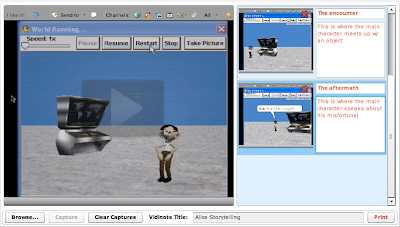
Below is a screen shot of "capturing" video to turn into notes....
Give Vidinotes a try by clicking here.
The reason I like Vidinotes so much is because of how easy it is, and that there is nothing out there quite like this.
Below is a screen shot of "capturing" video to turn into notes....

Give Vidinotes a try by clicking here.
Monday, December 28, 2009
Squareleaf

Wednesday, December 2, 2009
Scribbly
Scribbly is a an application from Adobe (uses Adobe Air) for emailing notes to yourself or others. This really is a nifty little app (free) that is easy to use. After installation a person can type on a note pad (similar to stickies on a Mac) and then email it to themselves.
I would probably be more inclined to use something like this then some online note taking site just for the fact that I take notes at any given time and I don't have to worry about staying logged into a site.
Below is a sample of Scribbly in action...

Download Scribbly by clicking here.
![Reblog this post [with Zemanta]](http://img.zemanta.com/reblog_e.png?x-id=3d333c23-9d30-47fb-9158-f568691e6353)
I would probably be more inclined to use something like this then some online note taking site just for the fact that I take notes at any given time and I don't have to worry about staying logged into a site.
Below is a sample of Scribbly in action...

Download Scribbly by clicking here.
Tuesday, April 7, 2009
Note Pub
Note Pub is a site I just discovered on Jennifer Dorman's wonderful blog. It is a site dedicated to creating/sharing/organizing your notes, w/ a web 2.0 style to it.
What I like about NP is how easy it is to get started. No long drawn out process where you have to enter a lot of info to create a user name and password, just click register and type away. The user end reminds me a lot of Wikipedia or something like that and any beginner should be able to pick up on that right away.
Another great feature is the ability to create groups and password protect anything (Wikipedia again). You can even create, chats, blogs, wikis, forums, etc.
Where I think NP needs some "fine tuning" is it's over look and feel. It just doesn't flow the way that some similar apps do such as Evernote or something like that. However, I still recommend checking it out!!
For more info click here.
![Reblog this post [with Zemanta]](http://img.zemanta.com/reblog_e.png?x-id=ad318f8c-9a08-4009-b5ed-2192eacb97cd)
What I like about NP is how easy it is to get started. No long drawn out process where you have to enter a lot of info to create a user name and password, just click register and type away. The user end reminds me a lot of Wikipedia or something like that and any beginner should be able to pick up on that right away.

Another great feature is the ability to create groups and password protect anything (Wikipedia again). You can even create, chats, blogs, wikis, forums, etc.
Where I think NP needs some "fine tuning" is it's over look and feel. It just doesn't flow the way that some similar apps do such as Evernote or something like that. However, I still recommend checking it out!!
For more info click here.
Subscribe to:
Posts (Atom)